

I’ve gone through multiple ColdIQ Inboxes reviews and noticed everybody missed one key thing. I want you to go to ColdIQ’s inboxes page and click on any “get started” button. You’ll be directed to book a strategy call, not a checkout. If you read it through the fine print on that calendar page, it mentions “InboxKit” as the provider, which is actually running your inboxes. Which makes ColdIQ Inboxes the front end, and the stack underneath belongs to InboxKit.
But plenty of companies resell someone else’s infrastructure. The questions I’m going to answer in this review:
- Is the underlying stack any good?
- Should we buy directly from InboxKit rather than paying more on ColdIQ?
Key Takeaways
ColdIQ Inboxes offers Google, Microsoft, and Azure inboxes in two ways: a self-serve subscription that you need to run yourself, or a done-for-you agency retainer where their team runs it. It is a cold email infrastructure product running on a white-labeled InboxKit stack which includes three inbox types, automated DNS, warmup, and InfraGuard monitoring from one panel.
- Inbox: Google, Microsoft, and Azure
- USP: Multi-inbox + full agency tier
- Deliverability: 95% inbox rate (promised on the website)
- Risk: You pay a reseller markup, roughly 60-120%
- Starting Plan: Self-serve runs $5.50 per Google or Microsoft/inbox/mo, billed monthly
- Support: Mixed reviews
About ColdIQ Inboxes
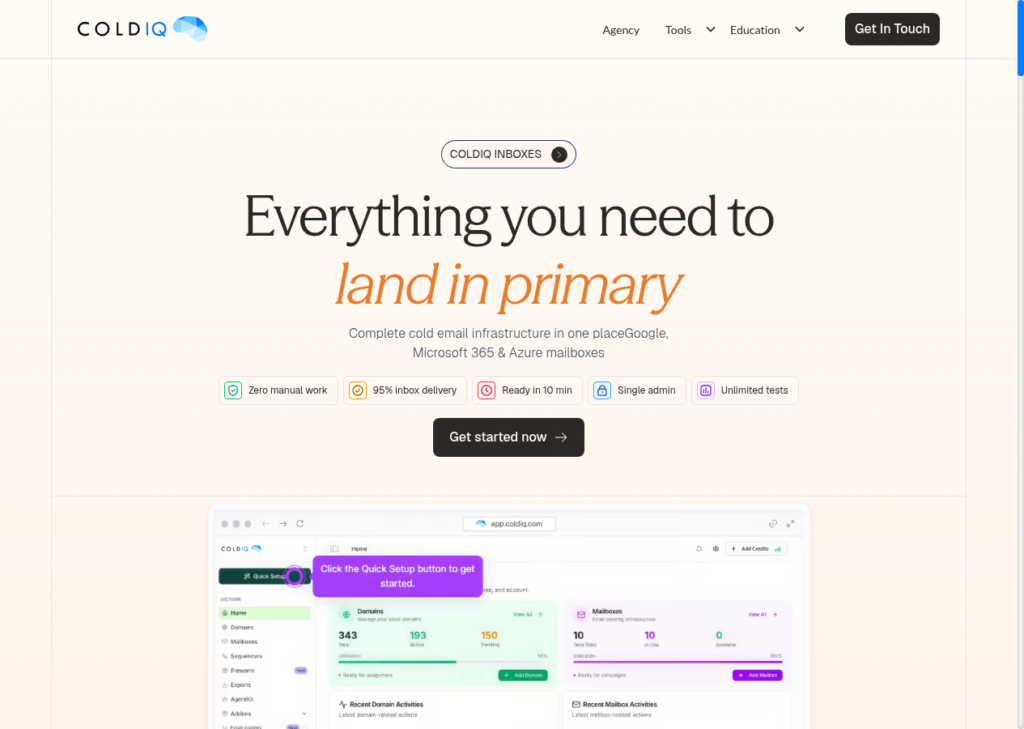
ColdIQ Inboxes is the cold email infrastructure product from ColdIQ, an outbound-sales agency. It offers complete cold email infrastructure: Google, Microsoft, and Azure inboxes provisioned and run from a single panel.
If you strip the ColdIQ branding, underneath it’s a white-labeled InboxKit. To sum up, you’re buying InboxKit’s Google, Microsoft, and Azure stack with ColdIQ branded on the front.
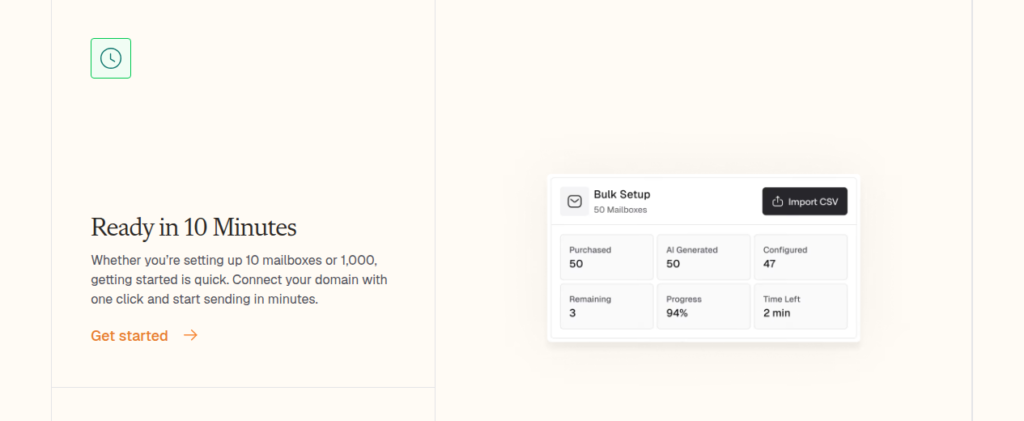
It offers Google and Microsoft reseller inboxes for $5.50 per mailbox, and Azure inboxes for $50 per domain. Their setup is quick, and you can connect your domain and SPF, DKIM, and DMARC auto-configure within ten minutes. Warmup is provider-run, and it ramps a new inbox sending limit to 40 a day over about two weeks.
How ColdIQ Inboxes Works
ColdIQ Inboxes Features
Multi-Inbox Provider
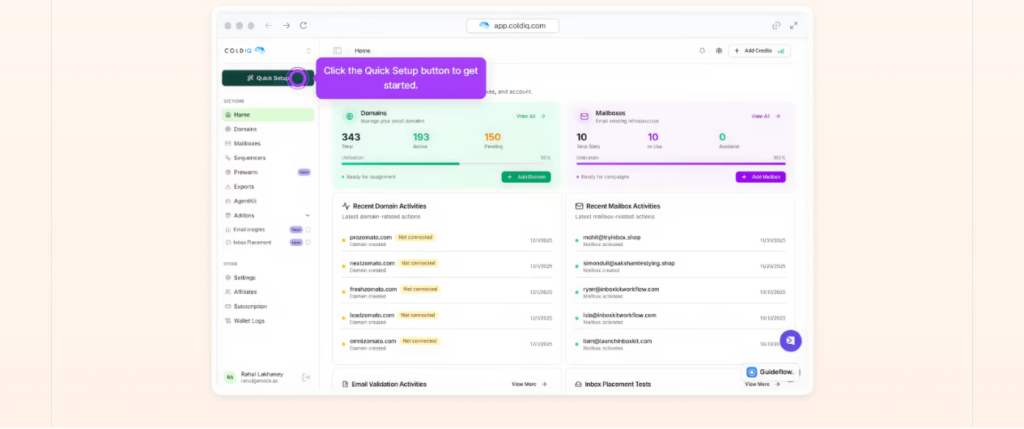
ColdIQ offers three types of inboxes – Google, Microsoft, and Azure. Each domain gets its own admin panel, and provisioning takes up to ten to twenty minutes.
Bulk Inbox Creation + Automated DNS Setup + Sequencer Integration
You can buy inboxes in bulk, and have the AI fill in the details. It does it ever so well, without touching each account. It also configures DNS + integrate inboxes across 16-plus sequencers.
Isolated Warmup Engine
ColdIQ offers a provider-run warmup. It ramps up the sending limit of each inbox from 2 sends a day up to about 40.
InfraGuard Domain Monitoring
InfraGuard checks blacklists every six hours against 50-plus lists, watches your DNS, tracks bounces, fires placement tests, and folds it all into one health score.
The Managed-Agency Retainer Tier
On top of the white-label, this is ColdIQ’s own layer, sitting on top. It takes the same inboxes and wraps them in a done-for-you outbound retainer. Under this retainer, they will build your secondary domains and inboxes, warm them up, put your lead lists together, write the email and LinkedIn sequences, and run the campaigns behind client-approval gates and a client-login dashboard. But you have to commit for three months up front. After that, there’s no lock-in, and the first campaign goes live around week three.
Pros
Three Verticals, One Panel
Google, Microsoft, and Azure inboxes all provisioned and run from one admin panel. You can diversify your email campaigns across different inbox types without reaching out to separate vendors.
Fast, Automated Setup
You can connect a domain in one click. The team auto-configures your SPF, DKIM, and DMARC and your inboxes are ready to go live in about ten minutes.
Real API and Sequencer Auto-Reconnect
Every plan ships a full REST API with webhooks, and connections auto-reconnect across 16-plus sequencers. A dropped link heals itself instead of quietly killing a live campaign.
Done-For-You Option
Instead of self-serve, ColdIQ runs the whole outbound program: secondary domains, warmup, lead lists, copy, sends, and reporting, all behind client-approval gates. If nobody on your team is technical, you can hand off cold email end-to-end and get a campaign live in about three weeks, without touching a DNS record or a sequencer.
Cons
Inboxes Sourced From Resellers
The Google inboxes are sourced from official Indian Google resellers. Compared to US-native Google accounts, these Indian-origin Google accounts have low deliverability success.
Monitoring Alerts, Not Managed Burn Detection
ColdIQ InfraGuard scans blacklists, DNS, and bounces, and it runs placement tests. However, the criteria are never published. It only pings you rather than managing the burn or moving you off a domain that’s already dying.
There was nothing in my InboxKit dashboard that showed anything wrong when I had my recent DNS issue. I want InboxKit to flag issues as soon as possible. I would rather know there is a problem immediately.
Verified InboxKit user, G2
Pay a Reseller Markup Over Buying InboxKit Direct
ColdIQ charges $5.50/inbox and $50 per Azure domain. You can buy the same InboxKit-provisioned stack straight from InboxKit at a cheaper cost. On InboxKit, the inboxes cost $2.50 to $3.50/inbox and $30 per domain.
“Dedicated Panel” Is Isolation on the Dashboard, Not the IP
ColdIQ sells “complete isolation” and “zero cross-contamination.” But if you look closely, you’re getting a separate admin panel per domain, not a dedicated sending IP.
ColdIQ Inboxes Pricing
| Category | Billed | Price/Month | Price / Mailbox |
|---|---|---|---|
| Google Workspace (self-serve) | Monthly | $5.50/inbox | $5.50 |
| Microsoft 365 (self-serve) | Monthly | $5.50/inbox | $5.50 |
| Enterprise Azure (self-serve) | Monthly | $50/domain | Varies (per-domain, not per-mailbox) |
| Agency / Enterprise retainer | Monthly (3-month initial commitment) | Custom | Not listed |
Aerosend: Best ColdIQ Inboxes Alternative
ColdIQ Inboxes resells you a white-labeled stack and hands you a panel that alerts you when something’s off. Its InfraGuard runs blacklist, DNS, and bounce checks alongside placement tests. However, the criteria are not defined, and the alert lands after the impact. On the contrary, Aerosend owns dedicated infrastructure, and it owns the placement result too. It runs domain burn alerts, inbox placement tests, and constantly warms the inboxes to keep the deliverability rate high.
Since Aerosend owns its infrastructure, it uses only fresh, never-used, aged IPs, geo-matched to the recipient, NA for NA and EU for EU. Here’s the complete difference between ColdIQ inboxes and Aerosend:
| Dimension | ColdIQ Inboxes | Aerosend |
|---|---|---|
| Infrastructure | White-labeled InboxKit reseller stack (Google, Microsoft, Azure) | Dedicated, privately owned infrastructure |
| Isolation | Admin panel per domain, no domains-per-IP ratio published | New isolation every 10 domains / 30 inboxes, never shared, ratio published |
| Monitoring / Burn Detection | InfraGuard alerts (blacklist, DNS, bounce, IPTs), criteria unpublished | Domain burn alerts on a 6-metric system plus biweekly inbox placement tests |
| Warmup | Provider-run Isolated Warmup engine, internals unpublished | Monitors 6-7 warmup providers, warms each inbox with the best one, moves on degrade |
| Sending IPs | Official provider IPs, not externally verifiable by the buyer | Fresh, never-used, aged IPs, geo-matched (NA for NA, EU for EU) |
| Control | Reseller of a reseller, hostage to Google and Microsoft policy | Owns the infrastructure and the team that runs it |
| Pricing model | $5.50/mailbox flat (GW/M365), $50/Azure domain; agency custom | $4/mailbox first 150, $2/mailbox beyond 150, month-to-month |
| Lock-in | Self-serve month-to-month; agency 3-month initial commitment | Month-to-month, cancel anytime |
| Buying Experience | No self-serve checkout, every button books a call, no free trial | Self-serve signup plus a call with the founder |
| Support | 24/7 advertised, responsive underlying team, incentivized review base | Executive support, response under 1 hour, Slack / WhatsApp / email / in-app |
Price/Mailbox Breakdown (~5,000 emails/day)
| Requirements | ColdIQ Inboxes | Aerosend |
|---|---|---|
| Mailboxes needed | ~200 (at ~25/mailbox/day) | 200 |
| Send rate per mailbox | ~25/day (warmup ramps to ~40/day ceiling) | 20-25/day |
| Plan | Google Workspace self-serve at $5.50/mailbox | Starter |
| Per-mailbox rate | $5.50 | $3.50 (blended) |
| Monthly total | ~$1,100 | ~$700 |
| Service model | Self-managed (or agency retainer) | Managed |
ColdIQ Inboxes Support
Support runs 24/7. However, no channels or SLA are mentioned for self-serve plans. Enterprise buyers get a dedicated Slack channel, a success manager, and an SLA. Pro and Agency plans promise 24/7 email and chat support.
The Verdict
Is ColdIQ Inboxes worth it? It depends on your efficiency and how much you know about cold emailing. It’s a capable stack that offers all three inboxes – Google, Microsoft, and Azure.
It is a done-for-you service, which involves paying a markup over the InboxKit stack. The monitoring warns you instead of managing the burn, and the methodology for warmup is not defined.
If managed deliverability, dedicated isolation, and burn detection + easy replacement matter to you more than a self-serve reseller panel, Aerosend is the managed alternative built around that outcome.
