




There’s a reason why shared inboxes are cheap. They inherit the reputation of every other sender account on that IP. That’s why more cold emailers are moving to dedicated private infrastructure.
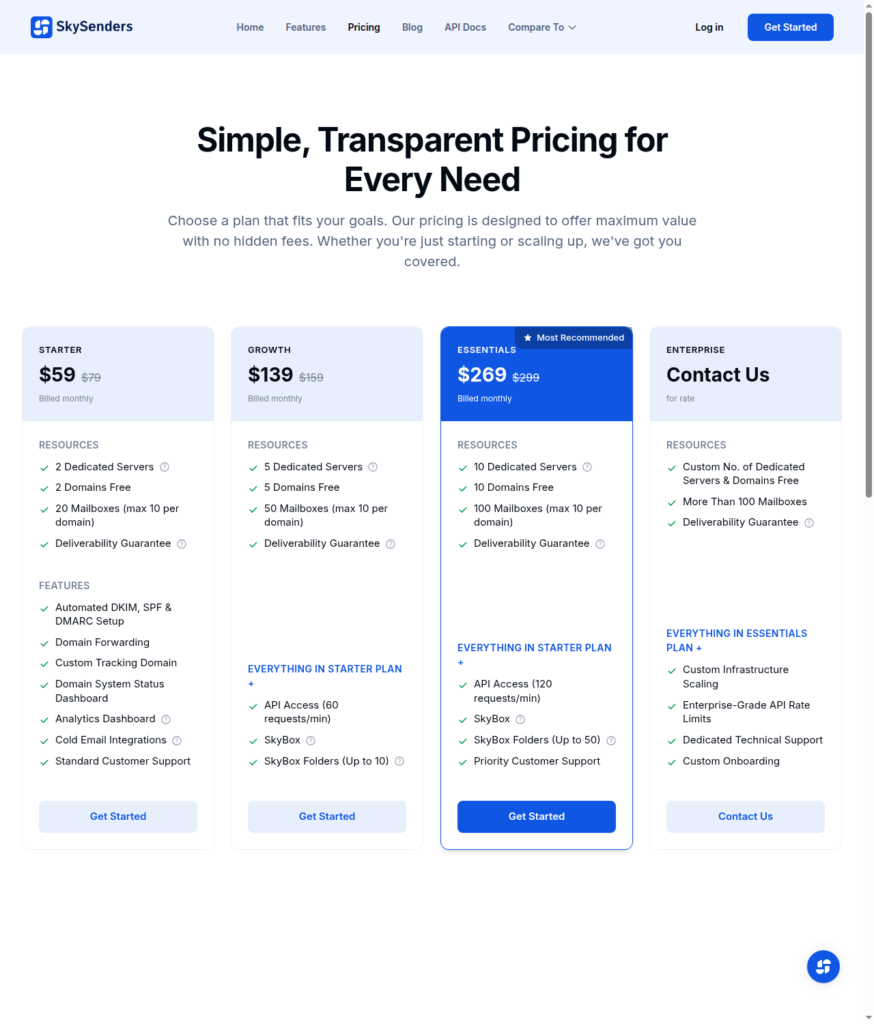
SkySenders is one of the cheapest ways to get it. You get 2 dedicated servers, 2 domains, and 20 inboxes for $59/mo.
But is “dedicated” enough to improve your reply rate?
In this SkySenders review, I’ll explain its dedicated infrastructure, total cost of sending at scale, and its support quality.
Key Takeaways
SkySenders offers dedicated private-infrastructure inboxes for $59, including 20 inboxes and 2 domains. It isolates 10 inboxes per domain, and domains are free. The setup is automated, and you can CSV export to your sequencer. It also includes detailed analytics, custom tracking, and “SkyBox” through which you can view replies, bounces, and delivery issues across all your accounts.
- Inbox: Dedicated Infrastructure
- USP: Dedicated IP Per Domain
- Deliverability: No independent evidence
- Risk: No Warmup or Burn Alerts
- Starting price: $59/mo for 20 Inboxes
- Support: Accessible via email, call, and in-app
About SkySenders
SkySenders is a cold email inbox provider offering dedicated infrastructure. The starting price is $59 for 20 inboxes, i.e., $2.95 per inbox. Its published inbox/domain ratio is 10 inboxes per domain, and these domains are free.
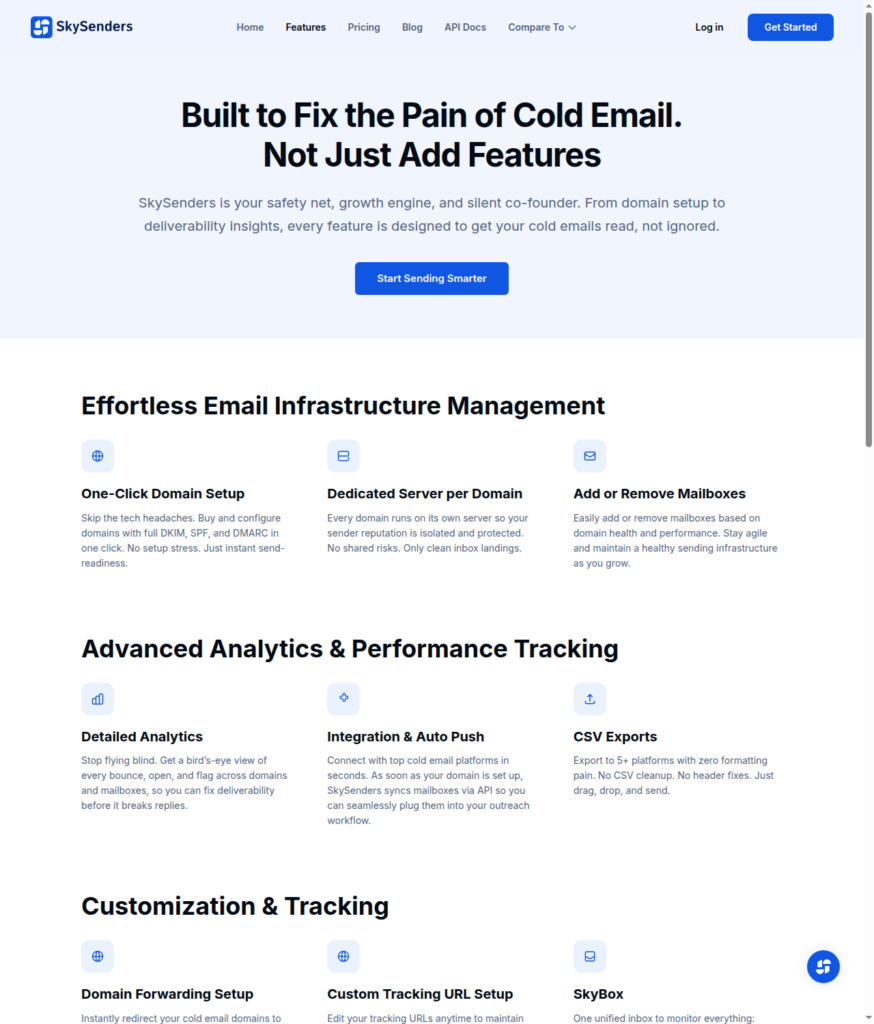
The setup is automated and configures SPF, DKIM, and DMARC. It provides API access to connect your inboxes to your sequencer in just one click.
But there are some downsides that you can’t ignore –
- Doesn’t provide warmup
- No inbox placement tests
- No burn alerts
- No replacement for burnt inboxes
So your deliverability depends on what you do after the setup. That means you have to run your warmup, and monitor everything using “SkyBox”.
How SkySenders Works
SkySenders Features
Dedicated IP per Domain
Each domain runs on its own servers with a dedicated IP, so your sender reputation stays isolated and protected.
SkyBox: Unified Inbox
SkySenders offers a unified inbox that combines replies from all domains and inboxes into a single inbox. It helps you manage and streamline follow-ups. However, it only comes in plans above Starter.
Domain Forwarding and Custom Tracking
You can set up domain forwarding to your main website so your leads can directly land on your main website.
API Access
You get API access that connects your inboxes to your sequencer. However, it is not available on the “Starter” plan; on the “Growth” plan, you’ll get 60 requests per minute.
Pros
Dedicated IP for Every Domain
Dedicated infrastructure means you can manage your sending reputation and maintain deliverability. SkySenders offers dedicated infrastructure, i.e., 1 server = 1 domain = 10 inboxes.
API Access
You can connect your sequencer to your inboxes in just one click using an API call. However, it is only available for Growth and Essentials plan users.
‘SkyBox’ For Monitoring
Through SkyBox, you can monitor everything – replies, bounces, and diagnose delivery issues across all your campaigns.
Cons
No Warmup
For good deliverability, it is important to warmup your inboxes. It helps you build sending reputation and credibility of your emails. If you don’t warmup, Google and Microsoft may start putting your emails in spam. That is why it is important, but SkySenders doesn’t provide warmup, so you have to do it yourself.
An Undisclosed Setup Fee
The SkySenders Refund Policy mentions a one-time setup fee. It covers IP allocation, DNS records, and mail-server provisioning, non-refundable once provisioning starts. But SkySenders doesn’t disclose the amount anywhere.
10 Inboxes Per Domain
Adding more inboxes on the domain is more harmful than beneficial. How? On the plus side, you can send a large number of emails from one domain, but if one of the inboxes gets flagged, it will take down the whole domain.
SkySenders Pricing
| Plan | Price/mo | Inboxes | Domains | Price/Inbox |
|---|---|---|---|---|
| Starter | $59 | 20 | 2 | $2.95 |
| Growth | $139 | 50 | 5 | $2.78 |
| Essentials | $269 | 100 | 10 | $2.69 |
| Enterprise | Gated behind “Contact Us” | “More Than 100” | Custom | Not published |
Starter20$59
- Price/mo
- $59
- Inboxes
- 20
- Domains
- 2
- Price/Inbox
- $2.95
Growth50$139
- Price/mo
- $139
- Inboxes
- 50
- Domains
- 5
- Price/Inbox
- $2.78
Essentials100$269
- Price/mo
- $269
- Inboxes
- 100
- Domains
- 10
- Price/Inbox
- $2.69
Enterprise“More Than 100”Gated behind “Contact Us”
- Price/mo
- Gated behind “Contact Us”
- Inboxes
- “More Than 100”
- Domains
- Custom
- Price/Inbox
- Not published
Aerosend: Best SkySenders Alternative
SkySenders offers dedicated private infrastructure. It isolates 10 inboxes per domain. The starting price is $59 for 20 inboxes, including free domains.
However, putting this many inboxes in a single domain is considered risky. If one inbox gets flagged, it can affect the domain’s deliverability, which can drop reply rates.
The setup is automated and configures your inboxes. With one API call, you can easily connect the inboxes to your sequencer with a single click.
But it doesn’t include warmup. So you have to run your own warmup.
Aerosend, on the other hand, offers dedicated infrastructure, with aged, geo-mapped IPs built for high deliverability. It puts only 3 inboxes per domain, which reduces the risk of burn.
You get IPs that have never been used + warmup + biweekly inbox placement tests + 6-metric domain burn detection + inbox replacement – all included.
So you don’t manage your deliverability – we do – so that you can focus on your campaigns.
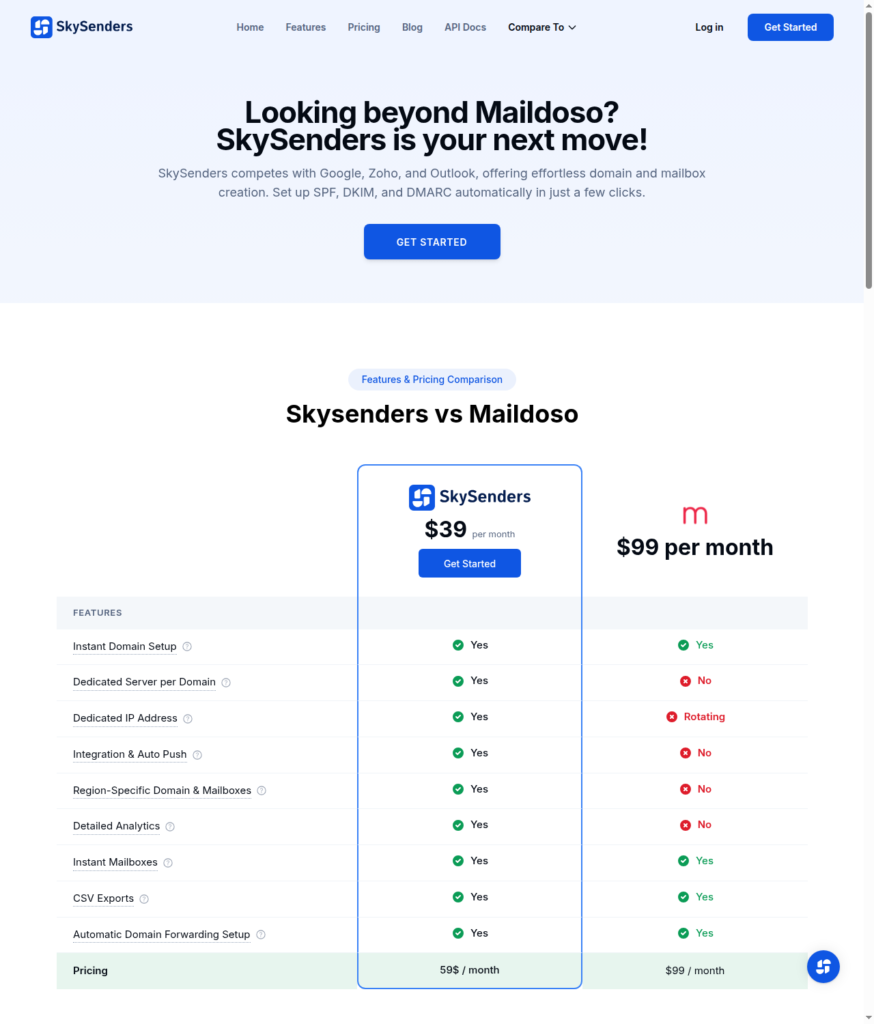
Here is the detailed comparison between SkySenders and Aerosend:
| Compare | SkySenders | AerosendPrivate infrastructure |
|---|---|---|
| Inbox Available | Private infrastructureDedicated server and dedicated IP per domain, 10 inboxes per domain | Private infrastructureBuilt for cold email, so no Google or Outlook bans |
| Isolation | ~10 inboxes per domainIsolation is per domain, but 10 inboxes share one domain reputation | ✓DedicatedNew isolation every 10 domains / 30 inboxes, never shared |
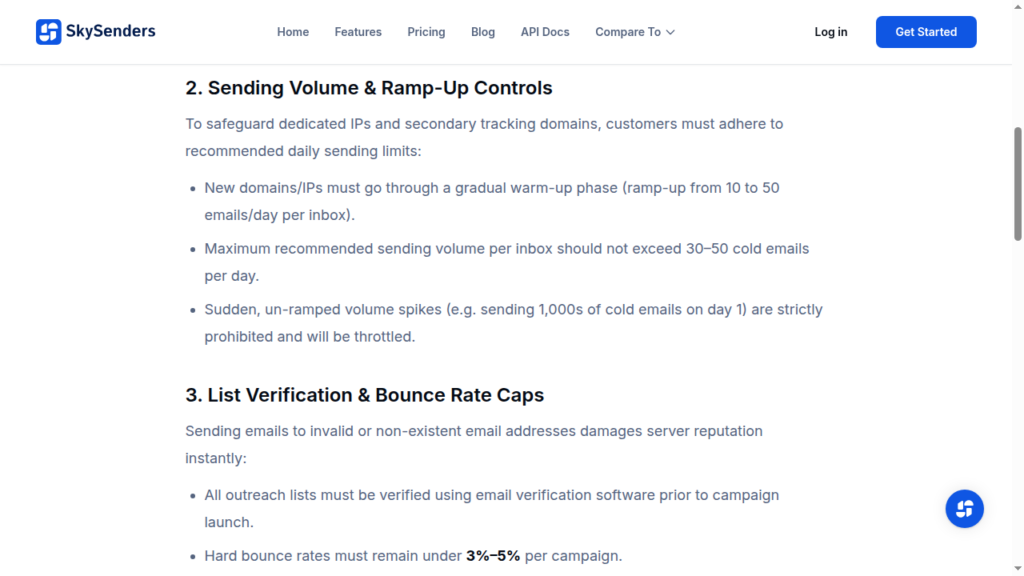
| Warmup | ✕Not includedThe Fair Use Policy tells you to ramp from 10 to 50 a day yourself | ✓Included, ongoingComplimentary premium warmup, matched to who you email |
| Monitoring | ~SkyBox onlySkyBox surfaces replies, bounces and delivery issues; no burn alerts | ✓Six metricsEvery domain scored daily and surfaced to you |
| Deliverability | ✕No placement testingNo inbox placement tests and no burnt-inbox replacement | ✓Our responsibilityBiweekly inbox placement tests, included |
| Domain Burn Alerts | ✕Not offeredNo burn alerts and no replacement for a burnt inbox | ✓IncludedBurnt domains flagged within 5 minutes, replaced in one click |
| Pricing | From $2.69 / mailbox$59 Starter is $2.95 a mailbox, plus an undisclosed one-time setup fee | $4 / inbox$2 per inbox past 150 · 30 inboxes = $120/mo |
| Ready To Test? | Visit SkySenders Website ↗ | Try Aerosend For Free |
Price/Mailbox Breakdown (~5,000 emails/day)
| Requirement | SkySenders | Aerosend |
|---|---|---|
| Inboxes Required | 100 | 200 |
| Sending Limit/Inbox | ~30-50/day | 20-25/day |
| Plan | Essential Plan: $269 Inboxes: 100 Domains: 10 | Starter/Growth (banded) |
| Price/Inbox | ~$2.69 | $3.50 (blended) |
| Monthly Total | $269 + setup fee | ~$700 |
SkySenders Support
There are three ways you can reach SkySenders
- Email support@skysenders.ai
- A phone number: +91 90428 59097.
- A “Chat Us: Chat with our Experts”
Starter and Growth plans get Standard Customer Support. The Essentials plan gets priority support, and the Enterprise plan gets dedicated support.
“they fully supported the implementation and onboarding”
Jason K., Small-Business (US), G2
The Verdict
SkySenders is a fair option if you want dedicated private infrastructure. Each domain gets its own server and IP, and the setup handles DNS, mailbox creation, and sequencer connection.
It isolates 10 inboxes per domain, which is a high risk because all inboxes share the same domain reputation. On top of that, it charges a one-time setup fee that it doesn’t disclose upfront.
Also, you don’t get warmup, inbox-placement testing, burn alerts, or burned-inbox replacement. So you have to manage your own deliverability.
If you are comfortable running your warmup, then SkySenders can be a good fit.
But if you want everything managed with only 3 inboxes per domain instead of 10, then Aerosend is a better option for your cold email outreach.
