

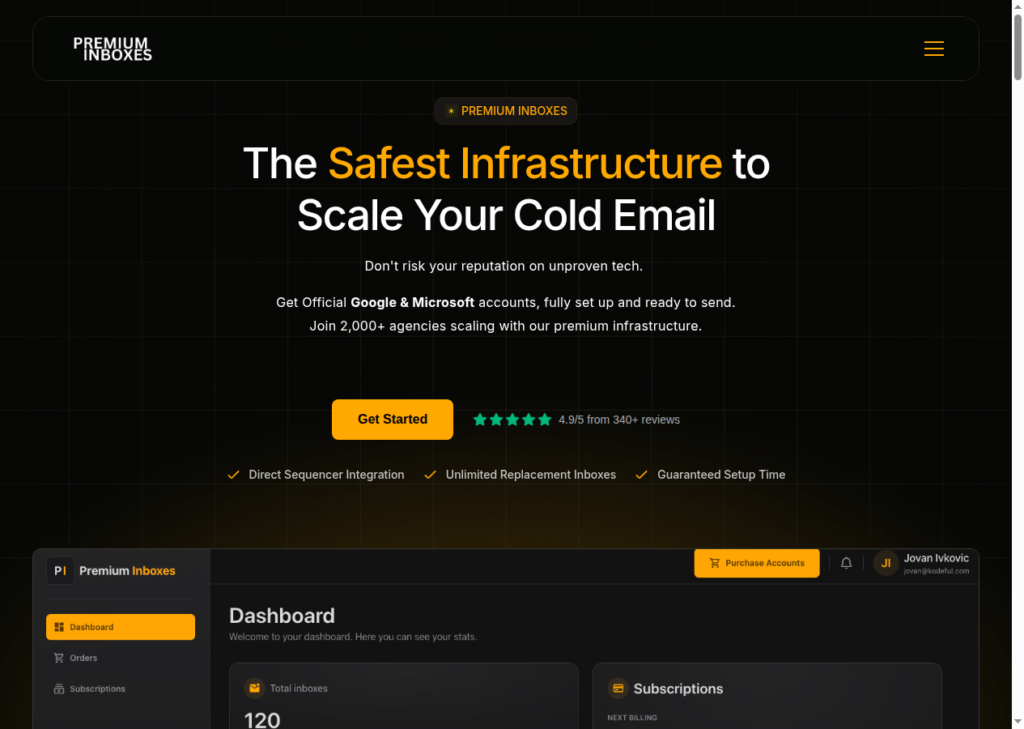
Premium Inbox is a multi-inbox provider offering Google and Microsoft inboxes. The tool markets itself as “The Safest Infrastructure to Scale Your Cold Email”.
In this Premium Inbox review, I’ve gone through 100+ reviews on Trustpilot and Reddit to answer whether “Premium Inboxes can help scale cold email campaigns?”
Key Takeaways
Premium Inbox is a Google and Microsoft inbox reseller. On the plus side:
- Automated DNS authentication
- Inboxes integrated with Sequencer
- Unlimited replacement of inboxes
- Inboxes are priced at $3.50
On the downside, the inboxes originated from India. Historically, these inboxes have witnessed lower deliverability success than US-origin inboxes.
- Inbox: Google and Microsoft
- USP: Multi-inbox provider
- Deliverability: Mixed
- Risk: "24-hour active monitoring" applicable on "Insured Infrastructure" plan
- Starting Plan: $3.50/inbox
- Support: Founder-level involvement and a Slack channel
About Premium Inboxes
Premium Inboxes is a multi-inbox provider that resells Google and Microsoft inboxes.
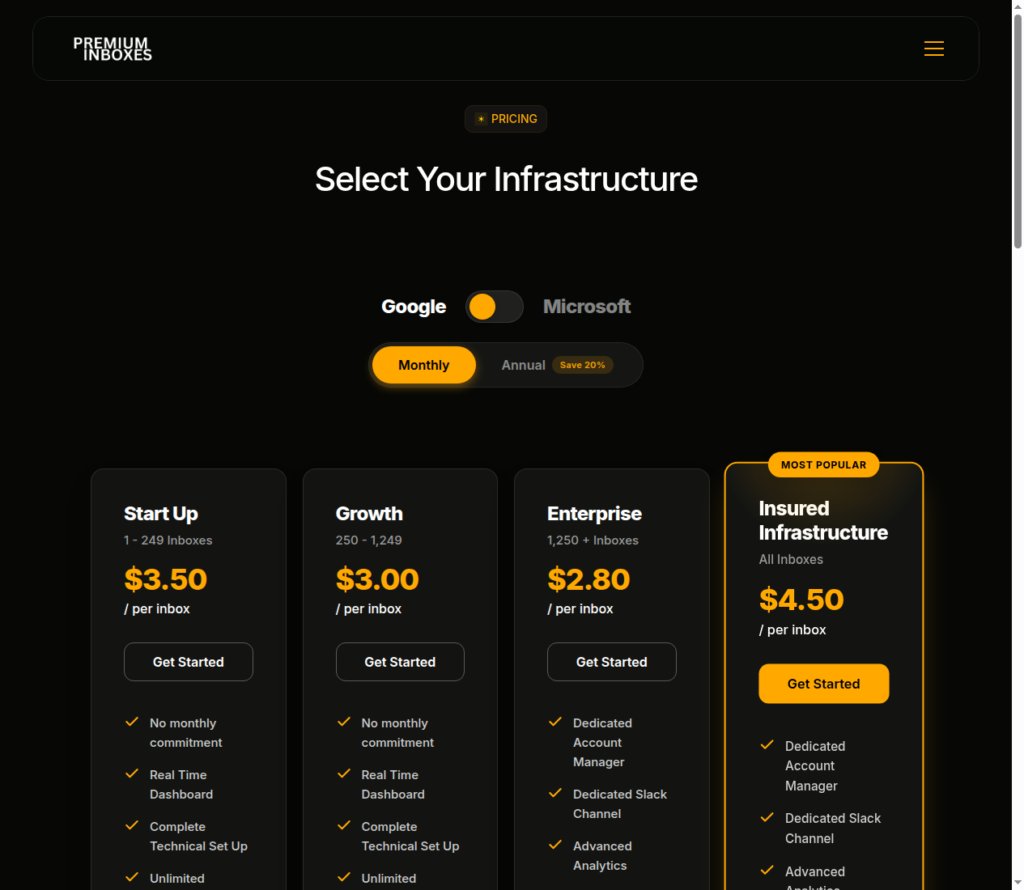
The inboxes are priced at $3.50/inbox. There’s no monthly subscription.
Post-purchase, Premium Inboxes manages DNS authentication and sequencer integration, and delivers ready-to-use inboxes in under 6 hours.
“24-hour active monitoring” is available on the ‘Insured Infrastructure’ plan.
How Premium Inboxes Works
Premium Inboxes Features
Automated Setup + Delivery Within 6 Hours
Premium Inboxes creates inboxes, sets up DNS authentication, integrates them into your sequencer, and runs a warm-up, all within 6 hours.
Unlimited Free Inbox Replacements
Premium Inboxes offer a safety net and replace flagged inboxes at no extra cost. This service is applicable with every plan.
However, every inbox starts with a fresh warmup cycle.
24-Hour Active Monitoring (Insured Tier Only)
Premium Inboxes offer “24-hour active monitoring” and advanced analytics. This helps in early burn detection and replacement.
Warmup Enabled at Handover
Premium Inboxes offer warmup, but it is only enabled at handover. This means the warmup runs once you receive the inboxes. But the warmup methodology is not defined.

Pros
Genuinely Fast Setup
Premium Inboxes sets up everything and delivers inboxes “live in under 6 hours”.
Founder-Level Support
If you’re buying inboxes from Enterprise or Insured Infrastructure plans, you’ll get direct access to the founder and team in Slack. So if something breaks, the founder is just a Slack away.
Unlimited Replacements
Unlimited free inbox replacement is available with every plan.
If an inbox is flagged, Premium Inboxes replace the inbox at no extra charge.
Cons
India-Origin Google and Microsoft Accounts
Premium Inboxes is a Google and Microsoft inbox reseller. The Google inboxes originated from India, which has lower deliverability success compared to US-origin Google inboxes.
Undefined Monitoring
Although Premium Inboxes offer “24-hour active monitoring”, the monitoring criteria are not mentioned. The credibility of this service is untested.
Warmup Criteria Not Defined
The warmup pool, metrics, and criteria are not defined by Premium Inboxes.
The deliverability success of an inbox depends on the quality of warmup. If the inboxes were not properly warmed up, their deliverability would be significantly affected.
Monitoring Available at Premium Plan
Premium Inboxes offer monitoring at the Premium plan. You have to pay $4.50/inbox to check deliverability performance of your inbox.
Premium Inboxes Pricing
Premium Inboxes offer both Google and Microsoft inboxes. The plans and prices remain the same.
| Plan | Inbox Band Range | Monthly Price/Inbox | Annual Price/Inbox |
|---|---|---|---|
| Start Up | 1-249 | $3.50 | $35.00 |
| Growth | 250-1,249 | $3.00 | $30.00 |
| Enterprise | 1,250+ | $2.80 | $28.00 |
| Insured Infrastructure | All volumes | $4.50 | $45.00 |
Each plan includes:
- Real-time dashboard
- Complete technical Set Up
- Unlimited replacement inboxes
- Inboxes uploaded directly to your sequencer
With “Insured Infrastructure”, you’ll get extra benefits, such as:
- Dedicated Account Manager
- Dedicated Slack Channel
- Advanced Analytics
- Priority Support
- Priority Build Queue
- 24-hour active monitoring
Premium Inboxes vs Aerosend
Premium Inboxes is a multi-inbox provider that offers Google and Microsoft inboxes. The setup speed is fast, and they will upload your inboxes directly to your sequencer.
However, the warmup and monitoring methodology is not defined. Therefore, the deliverability success is uncertain.
Aerosend offers a dedicated infrastructure specifically designed for deliverability and replies. Each server hosts 10 domains, i.e., 30 inboxes on fresh, never-used, aged private IPs matched to recipient geography.
Each inbox costs $4 and includes premium warmup and domain burn alerts on a six-metric system. It helps you monitor, manage, and diagnose your inboxes in real time.
Here’s the complete difference between Premium Inboxes and Aerosend:
| Compare | Premium Inboxes | AerosendPrivate infrastructure |
|---|---|---|
| Inbox Available | GoogleMicrosoftReseller; review says accounts are India-origin | Private infrastructureBuilt for cold email, so no Google or Outlook bans |
| Isolation | ✕Not publishedReseller accounts with no isolation details published | ✓DedicatedNew isolation every 10 domains / 30 inboxes, never shared |
| Warmup | ~At handover, undefinedWarmup starts on delivery; methodology not defined | ✓Included, ongoingComplimentary premium warmup, matched to who you email |
| Monitoring | ~Paywalled, unverified24-hour monitoring only on $4.50 Insured tier | ✓Six metricsEvery domain scored daily and surfaced to you |
| Deliverability | ✕Self-managedNo placement testing; deliverability success uncertain | ✓Our responsibilityBiweekly inbox placement tests, included |
| Domain Burn Alerts | ~Insured tier onlyMonitoring aids early burn detection; flagged inboxes replaced free | ✓IncludedBurnt domains flagged within 5 minutes, replaced in one click |
| Pricing | From $3.50/inbox$2.80 at 1,250+ inboxes; Insured tier $4.50/inbox | $4 / inbox$2 per inbox past 150 · 30 inboxes = $120/mo |
| Ready To Test? | Visit Premium Inboxes Website ↗ | Try Aerosend For Free |
Price/Mailbox Breakdown (~5,000 emails/day)
| Requirements | Premium Inboxes | Aerosend |
|---|---|---|
| Inboxes needed | ~334 | 200 |
| Send rate per inbox | 15/day (site-stated safe limit) | 20-25/day |
| Plan | Enterprise tier (~$2.80/inbox at 1,250+) or Growth (~$3.00 at 250+) | Starter then Growth |
| Per-inbox rate | ~$3.00 (Growth band at this volume) | $3.50 (blended) |
| Monthly total | ~$1,000 per 4 weeks | ~$700/month |
| Service model | Self-managed (monitoring paywalled) | Managed |
Premium Inboxes Support
You can contact the support team on Slack and Email.
Note: Access to dedicated Slack and an Account Manager is only available at the Insured ($4.50) tier.
Customer service is atrocious. They basically don’t respond to any tickets or emails. I bought 9 email addresses to migrate over to Instantly. Only 5 of them migrated. Nobody got back to me.
Chris Jones, Trustpilot
The Verdict
If you’re looking for a multi-inbox provider who can set up everything, you can opt for Premium Inboxes. It sets up your inboxes, integrates them with your sequencer, and runs warmup.
