




Most of the cold email inbox providers only sell inboxes. You buy them, connect them to your sequencer, and you handle the rest.
MithMill offers more. Along with fresh and pre-warmed Google and Microsoft inboxes, it also sells lead lists and fully managed campaigns.
But what about warmup, inbox placement tests, or burn alerts?
In this MithMill review, I’ll explain the features, latest pricing, support quality, and deliverability.
Key Takeaways
MithMill offers fresh and prewarmed Google and Microsoft inboxes. Setup is done for you, delivered within 24-48 hours, and connects to any sequencer. It publishes no warmup methodology, no inbox placement tests, and no burn alerts, so deliverability after delivery is your job.
- Inbox: Google & Microsoft
- USP: Lead Generation + Full Campaign Management
- Deliverability: Unproven (No Reviews Mention Deliverability)
- Risk: No Stated Ongoing Warmup or Monitoring
- Starting price: Google - $3, Microsoft - $3.5, Pre-warmed - $5
- Support: Phone, Email, Contact Form
About MithMill
MithMill is one of the cold email inbox providers that offers end-to-end setup for your cold outreach. It offers fresh, pre-warmed Google and Microsoft inboxes and also sells lead lists and fully managed campaigns.
MithMill is run by MITHMILL LTD, a company registered in the UK and incorporated on 24 September 2024.
Fresh Google inboxes start at $3, Microsoft starts at $3.5, and pre-warmed Google and Microsoft start at $5.
The setup is done for you and takes 24-48 hours to deliver the inboxes. You can connect your inboxes with any sequencer.
Setup includes “inbox warmup initiation”, but MithMill doesn’t publish how the warmup works. You don’t know what the warmup network is or how fast it ramps up.
The downside:
- No warmup methodology published
- No inbox placement tests
- No burn alerts
- No burnt inbox replacement
So you are paying for the infrastructure, but you have to monitor your own deliverability.
How MithMill Works
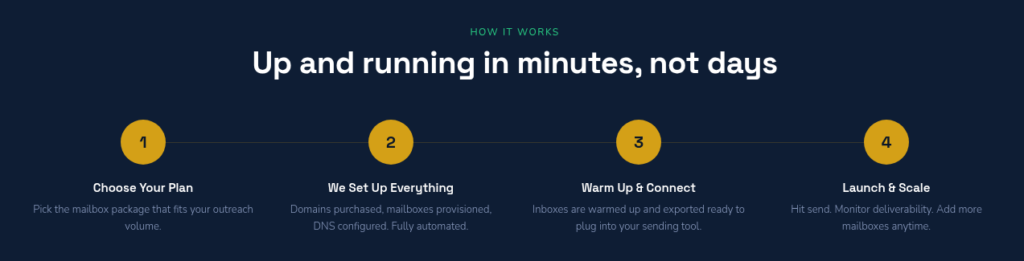
MithMill’s setup runs in four steps, from choosing a plan to launch, and the last step tells you to monitor deliverability yourself.
MithMill Features
Multi-Inbox Provider
MithMill offers Google and Microsoft inboxes. This lets you diversify your campaigns across both. If one provider tightens its rules, you can shift volume to the other instead of pausing your outreach.
Domain Purchase and Ownership
MithMill buys domains for you, or you can bring your own. It never publishes a domain price outside Microsoft pre-warmed, and nothing says a domain it buys is registered in your name.
Warmup
Setup includes “inbox warmup initiation”. But MithMill never says who warms a regular inbox after delivery, with what tool, and for how long. There is no explanation behind it.
Pre-warmed Inboxes
If you don’t want to wait for 2-3 weeks to warmup your inboxes, then you can directly buy pre-warmed inboxes. And start sending from day one. However, MithMill didn’t disclose the methodology.
Lead Generation
MithMill says it can build verified lead lists targeted to your ICP, with decision-maker contacts, emails, and company data.
Managed Campaigns
MithMill’s team can also run your campaigns for you, covering copywriting, sending strategy, A/B testing, and reply handling.
Pros
Google Inboxes From $3 a Month
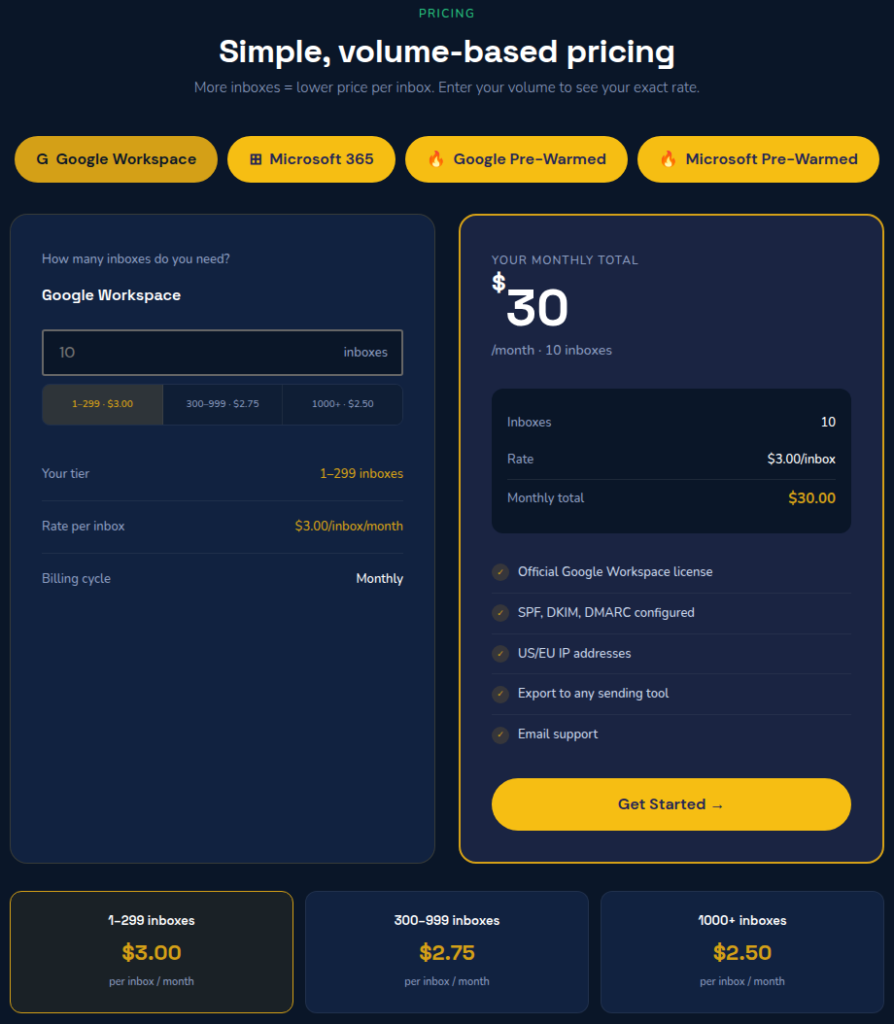
You pay $3.00 per inbox for 1 to 299, $2.75 from 300, and $2.50 from 1,000, and each inbox is a real per-seat Google license. MithMill publishes the rates openly, so you can price an order before you talk to anyone.
Microsoft Inboxes From $3.5 a Month
For MithMill’s Microsoft inboxes, you pay $3.5/inbox from 1 to 299, $3.25 from 300-999, and $3 from 1000+ inboxes.
Pre-warmed Inboxes
MithMill offers pre-warmed Google and Microsoft inboxes for $5. If you want to start sending from day one, then you can choose pre-warmed inboxes. But MithMill doesn’t define the methodology behind it.
The Setup Is Done for You
MithMill buys the domains, creates the mailboxes, configures authentication, and hands over credentials, and you get a free 30-minute discovery call before you pay. Two Trustpilot reviewers, neither verified, both wrote in March 2026:
“They made the cold outreach and email setup process simple and hassle-free.”
Dan, Trustpilot
“the service is top tier I recommand his service”
HUNTER MARKETING DIGITAL, Trustpilot
Cons
No Deliverability Monitoring
Monitoring tells you whether your emails land in the inbox or spam. But MithMill doesn’t provide inbox placement tests, burn alerts, or anything on the site about replacing a burnt domain. Without monitoring, the first sign of trouble is usually a drop in reply rates.
No Warmup Methodology Defined
MithMill starts warmup during setup, but it doesn’t say who keeps it running after delivery, with what tool, or for how long. The same goes for pre-warmed inboxes: no warmup network, no ramp-up schedule. You can’t judge what you’re paying for, and every pre-warmed purchase is final.
The $4 Pre-Warmed Price Starts at 300 Inboxes
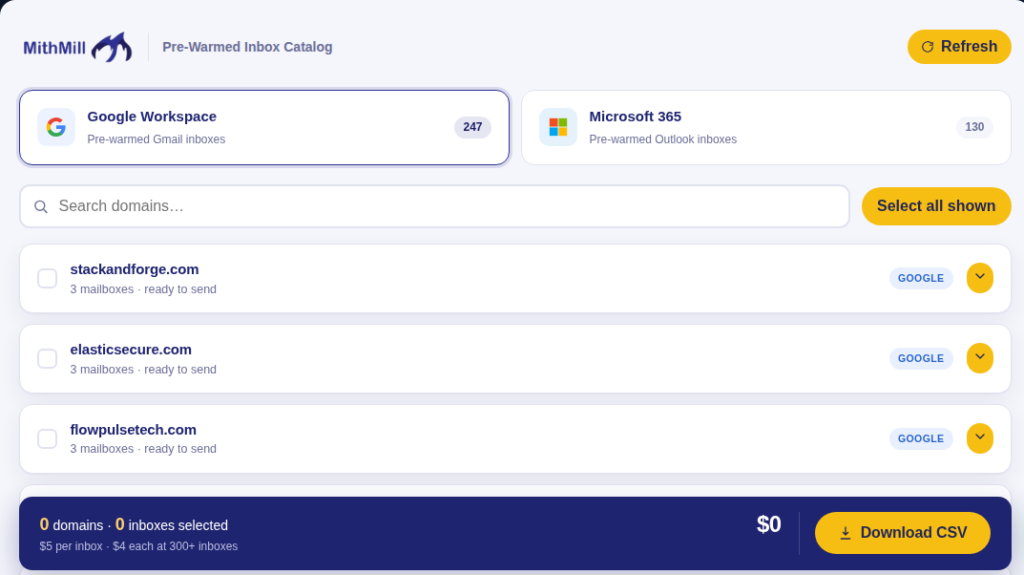
For pre-warmed inboxes, MithMill’s homepage shows “$4.00 Pre-warmed per inbox/mo”, while the catalog says “$5 per inbox · $4 each at 300+ inboxes”. So thirty inboxes cost $150 a month, not $120; the $4 rate starts at $1,200, and every pre-warmed purchase is final.
$3 a Seat Is a Signal You Cannot Check From Outside
Anything below $5 Google seats is, in this category, a signal that the inboxes are sourced from Indian-origin resellers. So ask MithMill before buying which billing region your licenses sit in and whose name will appear under Billing in your Google Admin console.
MithMill Pricing
MithMill charges per inbox per month, and the rate drops at 300 inboxes and again at 1,000. Pre-warmed inboxes have a single price break, at 300.
| Plan | Price/Inbox/Month | 30 inboxes on 10 domains |
|---|---|---|
| $3.00 at 1 to 299 $2.75 at 300 to 999 $2.50 at 1,000+ | $90 + 10 domains | |
| Microsoft | $3.50 at 1 to 299 $3.25 at 300 to 999 $3.00 at 1,000+ | $105 + 10 domains |
| Google Pre-warmed | $5.00 at 1 to 299 $4.00 at 300+ | $150 |
| Microsoft Pre-warmed | $5.00 at 1 to 299 $4.00 at 300+ | $150 |
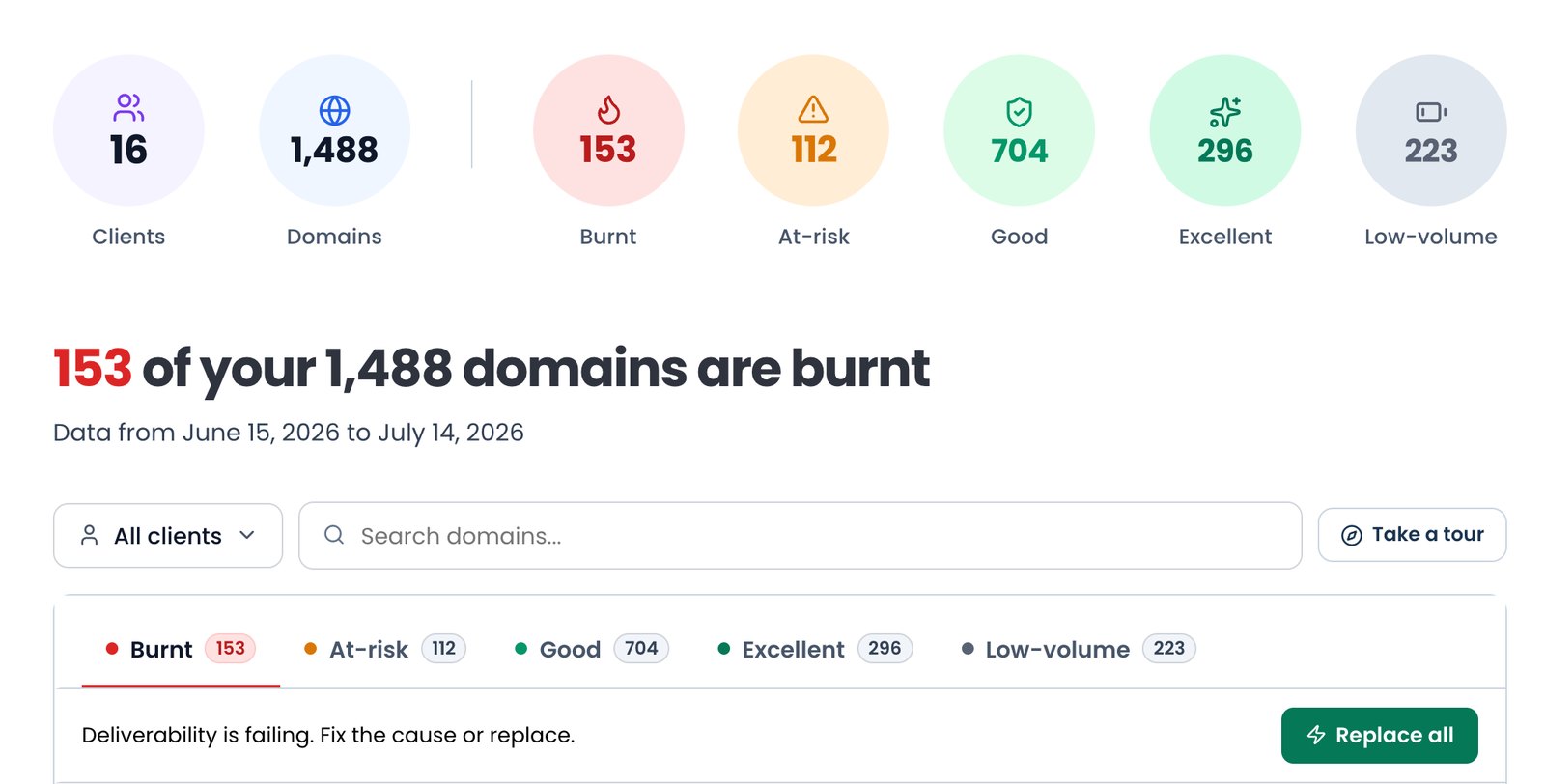
Aerosend: Best MithMill Alternative
MithMill offers fresh and pre-warmed Google and Microsoft inboxes. It also sells lead lists and fully managed campaigns.
MithMill handles the setup for you and configures the SPF, DKIM, and DMARC records in under 24-48 hours. And you can easily connect your inboxes with any sequencer you use.
The downsides:
- A sub-$5 price, which signals India-origin inboxes
- No published isolation matrix
- No methodology behind pre-warmed inboxes
- No inbox placement tests or burn alerts
- No replacement of burnt inboxes
So, you’re buying the inboxes, but you have to manage your own deliverability.
Aerosend, on the other hand, runs private infrastructure with dedicated IPs, isolates every 10 domains with 30 inboxes on aged, never-used IPs, and includes premium warmup using WarmupInbox.
And provides biweekly inbox placement tests + burn alerts + replacement for burnt inboxes at no cost.
Here is a detailed comparison between MithMill and Aerosend:
| Compare | MithMill | AerosendPrivate infrastructure |
|---|---|---|
| Inbox Available | Google WorkspaceMicrosoft 365Pre-warmedResold per-seat licenses, sold per inbox | Private infrastructureBuilt for cold email, so no Google or Outlook bans |
| Isolation | ~UndisclosedNo isolation or shared-panel statement on any page | ✓DedicatedNew isolation every 10 domains / 30 inboxes, never shared |
| Warmup | ~Started, then unstatedSetup includes "inbox warmup initiation"; who warms the inboxes after delivery is never stated | ✓Included, ongoingComplimentary premium warmup, matched to who you email |
| Monitoring | ✕Not on inbox plans"Hit send. Monitor deliverability." makes it your step | ✓Six metricsEvery domain scored daily and surfaced to you |
| Deliverability | ~Claimed, unverified"98% Inbox Delivery Rate" with no method; the "10/10" proof is a static widget | ✓Our responsibilityBiweekly inbox placement tests, included |
| Domain Burn Alerts | ✕Not offeredNothing on the site detects or replaces a burnt domain | ✓IncludedBurnt domains flagged within 5 minutes, replaced in one click |
| Pricing | $3.00 / inbox, 1 to 299$2.75 from 300, $2.50 from 1,000; domains extra, unpriced | $4 / inbox$2 per inbox past 150 · 30 inboxes = $120/mo |
| Ready To Test? | Visit MithMill Website ↗ | Try Aerosend For Free |
Price/Mailbox Breakdown (~5,000 emails/day)
| Row | MithMill | Aerosend |
|---|---|---|
| Inboxes Required | 250 Google inboxes | 200 |
| Sending Limit/Inbox | 20/day | 20-25/day |
| Plan | Google, 1 to 299 tier | Starter/Growth (banded) |
| Price/Inbox | ~$3 | $3.50 (blended) |
| Monthly Total | $750 plus 84 to 125 domains (price not published) | ~$700 |
MithMill Support
Support runs on:
- WhatsApp, via a widget on every page.
- Phone, on the same UK mobile number.
- Email, at support@mithmill.com.
- A contact form.
- A free 30-minute discovery call.
The only customer evidence on support is positive. It comes from two Trustpilot reviewers, neither verified, both writing in March 2026:
“Communication was great! and also they were quick to assist whenever we needed support.”
Dan, Trustpilot
“Mithmill is very efficient and quick to respond”
HUNTER MARKETING DIGITAL, Trustpilot
The Verdict (Rating - 2.5)
MithMill is a good fit for you if you want fresh and pre-warmed Google and Microsoft inboxes. And you are comfortable running your own warmup for fresh inboxes and managing your own deliverability.
But if you want managed deliverability, including inbox placement tests + burn alerts + ongoing warmup + replacement inboxes, then Aerosend is a better option.
