

Mailrun is a cold-email inbox service provider.
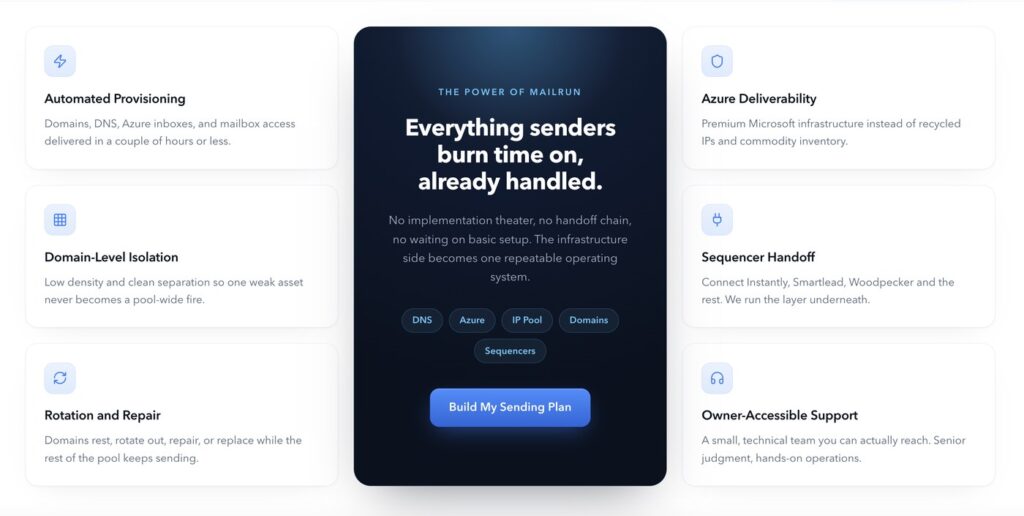
It offers Microsoft Azure email inboxes and takes care of the technical setup for you.
You can buy inboxes without talking to a salesperson.
It creates 10 inboxes per domain, whereas many other Azure providers create more than 10. The setup is usually slow and takes about 48 hours.
But there is one important thing to know: each inbox can send only about 5 emails a day. Therefore, if you want to send a lot of emails, you have to buy multiple inboxes.
In this Mailrun review, I’ll explain the features, pricing, email sending limits, deliverability, and support so you can decide whether it is worth buying.
Key Takeaways
Mailrun offers Azure inboxes for $1.29 and is billed at the domain level for $129/mo. It auto-configures Azure inboxes and connects them to your sequencer. Setup takes about 48 hours. But there’s no warmup, or burn monitoring to manage your deliverability.
- Inbox: Azure
- USP: Only 10 Azure inboxes per domain
- Deliverability: Low
- Risk: Frequent Azure inboxes burn confirmed by Founder
- Starting Plan: $129/month for 100 inboxes
- Support: Bad. Limited to chatbot
About Mailrun
Mailrun is a cold-email inbox provider that offers Azure inboxes. Each domain comes with 10 Azure inboxes. You can also bring your own domain or buy one from Mailrun for $15 per year.
It sets up the domain configuration for you and connects the inboxes to your sequencer.
The setup is mostly done within about 48 hours. But if you buy it in bulk, the setup might take longer than expected.
Mailrun also has a pre-warmed option for $19/month/domain for 5 inboxes, with a minimum order of 10 domains. So the total value for pre-warmed inboxes is $190/mo, but it has a 3-month lock-in period.
However, Mailrun doesn’t offer ongoing warmup or deliverability monitoring. Therefore, for fresh inboxes, you need to warm them yourself and manage your deliverability on your own.
How Mailrun Works


Mailrun Features
10 Inboxes Per Domain
For each domain, Mailrun adds 10 inboxes. Compared to industry standards of adding 49–99 Azure inboxes on one domain, this is done to improve deliverability.
From each inbox, you can send around 5 cold emails per day; that is 50 emails per domain.
So, if you want to send 2,000 emails a day, you need around 400 inboxes.
On the Azure side of stuff, less is more. We like to do just 10 inboxes per [domain], sending five emails per day per box. So it comes out to be at max 50 emails per domain.
Ken Vulk, founder of Mailrun
Pre-Warmed Inboxes are Available
Mailrun also offers pre-warmed domains and inboxes for $190/mo (10-domain minimum). However, the warmup methodology is not defined.
Automated Setup
Mailrun sets up DNS configurations, and your inboxes are ready for cold emailing in ~48 hours.

Pros
Cheap At Scale
Mailrun shows its prices publicly, so you can see what you will pay before buying. As you buy at scale, the price/inbox reduces.
You can buy the inboxes directly through their page and start without talking to a salesperson.
Genuine Isolation
Mailrun uses real Azure tenants and keeps 10 inboxes on each domain. This is lower than the 49–99 inboxes that many other Azure providers place on a single domain.
Bring Your Own Domains
You can use your own domains with Mailrun without paying a higher subscription price.
Mailrun charges a $15 annual domain fee when you buy domains from them.
Cons
Azure Domains Burn And Need Re-Buying
This is the biggest risk with Mailrun. Azure inboxes’ deliverability is volatile. Mailrun’s own founder admits that Azure domains can “burn faster” and that you may need to buy new domains again after a few months.
Mailrun’s 10-inbox-per-domain setup is meant to reduce this risk, but it does not fully mitigate it.
The biggest feedback we got negatively about Azure […] is that these things, they tend to burn faster […] it does cost more from a domain-investment perspective on the front end, but […] you’ll probably be buying them again in a couple months.
Ken Vulk, founder of Mailrun (Cold Email Deliverability Round Table 2025)
No Deliverability Monitoring
Mailrun does not provide ongoing deliverability monitoring. There is no domain-burn alert, inbox-placement testing, blacklist monitoring, or reputation dashboard. You have to use other tools to check whether your emails are still reaching inboxes.
No Warmup Methodology Defined
Mailrun offers pre-warmed inboxes for $190 per month/10 domains/50 inboxes. However, they didn’t define their warmup methodology, so the credibility of their warmup is unknown.
Low Sending Limit
Each Mailrun inbox can send only around 5 cold emails per day. This means you need a lot of inboxes to send at scale. For example, sending 2,000 emails a day would require around 400 inboxes.
So while the price per inbox looks cheap, the real cost can become much higher when you need hundreds of inboxes to send at scale.
API is Gated to Authorized Customers
API access is only available for certain approved deployments after onboarding. The documentation and credentials are gated behind approval.
Mailrun Pricing
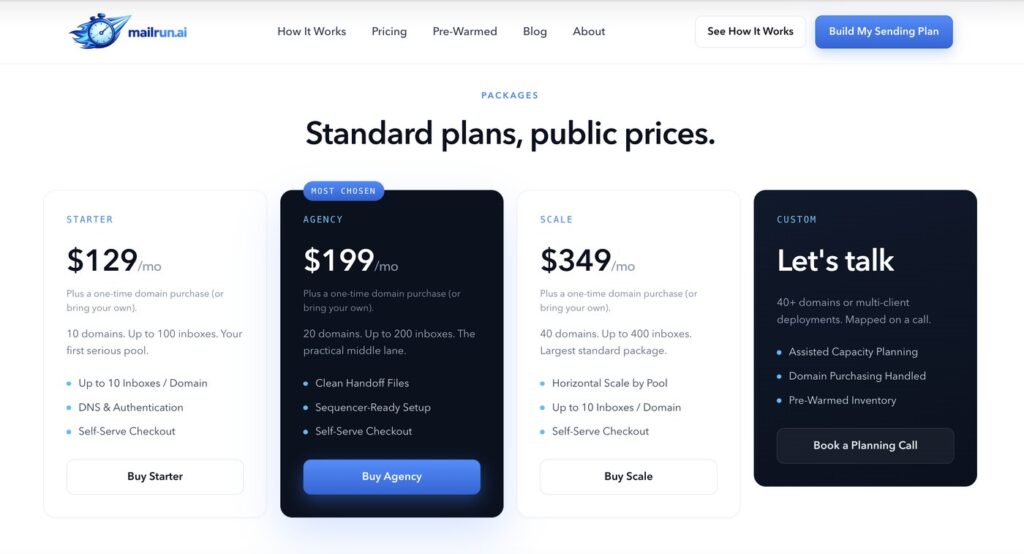
| Category | Inboxes | Price | Price / Inbox |
|---|---|---|---|
| Starter | 100 | $129/mo | $1.29 |
| Growth | 200 | $199/mo | $1.00 |
| Scale | 400 | $349/mo | $0.87 |
Note: You can also buy pre-warmed inboxes. The starter pack is billed at $190/mo (10-domain minimum). Each domain consists of 5 Azure inboxes.
Each plan includes:
- Microsoft Azure inboxes
- Domain and inbox setup
- Automated setup takes about 48 hours
- Provides pre-warmed inboxes (No warmup methodology defined)
- Bring your own domains option
Mailrun vs Aerosend
Mailrun and Aerosend take different approaches to cold email.
Mailrun gives you Azure inboxes and lets you manage the deliverability yourself. It is cheaper, but lately Azure deliverability is worse compared to its peers – Google, Microsoft, or dedicated infrastructure. It is verified by many industry leaders and ESPs.
Mailrun’s founder mentioned that Azure domains can burn faster. This means you may need to replace them after a few months.
On the other hand, Aerosend offers dedicated infrastructure and manages deliverability for you.
Aged and geo-matched IPs: Aerosend provides a complete setup, which includes warmup, inbox placement testing, and burn monitoring.
Here’s the brief comparison between Mailrun and Aerosend:
| Compare | Mailrun | AerosendPrivate infrastructure |
|---|---|---|
| Inbox Available | AzurePre-warmed10 Azure inboxes per domain, about 5 sends/day each | Private infrastructureBuilt for cold email, so no Google or Outlook bans |
| Isolation | ~Tenant per domainReal Azure tenants, 10 inboxes/domain; no dedicated IPs | ✓DedicatedNew isolation every 10 domains / 30 inboxes, never shared |
| Warmup | ~Pre-warmed onlyNo ongoing warmup; methodology not defined, 3-month lock-in | ✓Included, ongoingComplimentary premium warmup, matched to who you email |
| Monitoring | ✕Not offeredNo blacklist monitoring or reputation dashboard | ✓Six metricsEvery domain scored daily and surfaced to you |
| Deliverability | ✕You own itNo inbox placement testing; self-managed | ✓Our responsibilityBiweekly inbox placement tests, included |
| Domain Burn Alerts | ✕Not offeredFounder says Azure domains burn faster | ✓IncludedBurnt domains flagged within 5 minutes, replaced in one click |
| Pricing | $129 per 100$1.29/inbox Starter, $0.87 at 400 inboxes | $4 / inbox$2 per inbox past 150 · 30 inboxes = $120/mo |
| Ready To Test? | Visit Mailrun Website ↗ | Try Aerosend For Free |
Price/Mailbox Breakdown (~5,000 emails/day)
| Requirements | Mailrun | Aerosend |
|---|---|---|
| Inboxes needed | ~1,000 | 200 |
| Send rate per inbox | ~5/day | 20-25/day |
| Plan | ~2.5x Scale Plan (400-inbox tier) | Blended |
| Per-inbox rate | $0.87 | $3.50 (blended) |
| Monthly total | ~$870 (inboxes) + ~$125/yr domains + Warmup not included | ~$700 |
| Service model | Self-managed | Managed |
Mailrun Support
Support is available via chatbot. Also, there are no independent reviews on G2, Trustpilot, Reddit, etc., to confirm the quality of its support.
The Verdict
Mailrun can be a good option if you want cheap Azure inboxes and a done-for-you setup. Apart from the setup, you have to manage everything – warmup, deliverability, burn monitoring, etc.
Also, with Azure inboxes, the sending limit is 5 emails per day. It can burn over time, as stated by the Mailrun Founder. So the cost incurred will be high.
If you want an ESP that manages deliverability for you, Aerosend is a better choice.
