

Even if you assign dedicated IP to a domain, but if it’s hosted on a shared IP pool, its performance will decline. Lately, many cold emailers are quitting shared IP pools for that very reason.
It works for three weeks, then one week it just stops working. You can blame it on your lead list, copy, but actually the pool is diluted with spammy IPs.
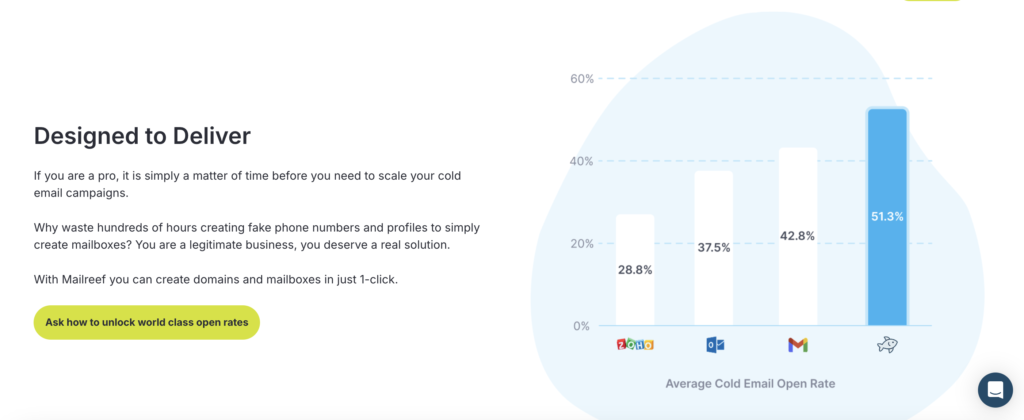
Mailreef gives what every customer wants – a dedicated server and IP for cold emailing. No shared or rotating IPs. It offers 150+ inboxes on a dedicated mail server and IP. The reason is simple: to maintain your sending reputation.
In this Mailreef review, I’ll share the insights on Mailreef infrastructure, and the total cost of sending a cold email campaign from Mailreef.
Key Takeaways
Mailreef offers dedicated cold emailing infrastructure that gives real ownership of sending and deliverability to you. Each customer gets their own mail server, a dedicated IP, and 150 or more inboxes auto configured for cold outreach. The infra includes – server & mailbox monitoring, developer API access, live technical support and smooth sequencer integration.
- Inbox: Private Infrastructure
- USP: Dedicated mail server and IP per client
- Deliverability: Client-isolated
- Risk: No Burn Monitoring
- Starting Plan: $240/mo + $0.001/Send
- Support: Live "Delivery Consulting" chat
About Mailreef
Mailreef provides a dedicated infrastructure for cold email. You own the whole delivery stack! There’s no shared-pool neighbors dragging your reputation down.
Each client gets a dedicated mail server and IP. However, the domains are hosted on one IP.
150 or more inboxes are included per server, with an option to create unlimited free inboxes on a server.
You can bring your own domain or buy pre-configured domains from Mailreef.
The setup is quick. It can spin up inboxes in seconds – auto-configure SPF, DKIM, and DMARC and export straight to sequencer.
Mailreef ships a one-time “pre-warmed” server, domains, and inboxes at setup.
How Mailreef Works
Mailreef Features
Dedicated Mail Server and IP per client
That’s Mailreef’s real differentiator. Unlike others, it offers a fully dedicated mail server and IP to each customer. All your domains share that single IP.
Quick Setup of 150+ Inboxes Per Server
Mailreef setup speed is its genuine strength. It can set up 150 or more inboxes and configure DNS authentications in seconds.
Pre-warmed Server, Domains, and Inboxes
Mailreef offers “pre-warmed” inboxes, domains and server, and you can start sending from day one.
Server and Mailbox Monitoring
Mailreef offers server and mailbox monitoring with each plan. However, the methodology for monitoring is not published.
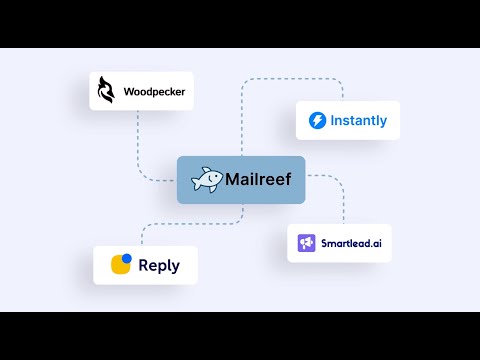
Developer API with Smartlead and Instantly integration
With developer API you can programmatically create inboxes, and native Smartlead and Instantly integration.
Delivery Consulting
With Mailreef every plan, “Delivery Consulting” is included. Access to experts on live chat to guide you through issues or optimize campaigns.
Pros
Genuinely Dedicated Infrastructure
On Mailreef each client gets a real dedicated server and IP, not a shared pool and not a resold seat. It helps with managing sender reputation.
Fast, Automated Setup
Mailreef connects domains, and sets up inboxes in minutes. Each inbox is auto-configured with SPF, DKIM, and DMARC. It removes manual editing of DNS records, and gets your DMARC policy right.
Sequencer-Ready Integrations
With developer API the inboxes are integrated straight into your sequencer – Smartlead, Instantly, etc.
Human Deliverability Support on Every Plan
You’ll get access to live delivery-consulting chat on every tier. Real experts are available on chat to guide you through.
Cons
No Per-Domain Isolation, One IP for Everything
Mailreef isolates you from other customers but not your own domains from each other. The real setup at Mailreef includes – 30 domains and 90 mailboxes on one server and one dedicated IP. Every domain shares that single IP.
If that IP gets flagged, the deliverability of all of your domains will decline. There is no secondary IP, or backup.
Monitoring Is a Feature, Not a Method
“Server & Mailbox Monitoring” appears as a feature but there’s no published methodology.
Moreover, there’s no burn-detection, inbox-placement, and metric set.
After setup, there is no defined mechanism to catch or diagnose a domain starting to burn. You’ll only know when your replies dry up.
No Ongoing Warmup
Mailreef offers “pre-warmed” server, domains, and mailboxes. Post purchase, there’s no ongoing warmup, dashboard, or ramp schedule.
For continuous warmup, you have to run it through your sequencer or a third-party tool.
Opaque IP Provenance
The IP source, age, geo that Mailreef offers with each server is not published. You cannot verify from the site whether the IP you’ve received has a clean history or not.
Premium Price With a Per-Send Surcharge That Has No Ceiling
You’re paying $240 to $249 a month for the infrastructure. For sending emails, you’ve to pay an extra – $0.001 for every one sent + $19 per added domain.
Mailreef Pricing
Mailreef plans include – two paid tiers plus a custom option, all priced per server.
| Category | Billed | Mailboxes | Price/mo |
|---|---|---|---|
| Agency | 12-month commitment | 150+ per server | $240 + $0.001/send |
| Agency Flex | Month-to-month, cancel anytime | 150+ per server | $249 + $0.001/send |
Aerosend: Best Mailreef Alternative
Isolation / IPs
Mailreef: One dedicated server + IP per client.
Aerosend: Creates a fresh isolated server with aged IPs every 10 domains / 30 inboxes.
Warmup
Mailreef: Ongoing warmup is left to your sequencer.
Aerosend: Includes Warmup Inbox free (~$40/inbox/mo value).
Monitoring
Mailreef: Each plan includes “Server & Mailbox Monitoring”, but no methodology published.
Aerosend: Offers burn-detection + biweekly inbox placement tests.
I’ve put the two side by side here:
| Factor | Mailreef | Aerosend |
|---|---|---|
| Infrastructure Model | Dedicated Infrastructure per client | Dedicated + private isolated infrastructure |
| Isolation | Dedicated per client, but one IP for all your domains, no per-domain isolation | New isolated server every 10 domains / 30 inboxes, never shared, ratio published |
| IP Provenance | Not disclosed (no source, age, or geo published) | Only fresh, never-used IPs, aged before use, geo US/EU (NA for NA) |
| Warmup | One-time “pre-warmed”, ongoing warmup on your sequencer | Warmup Inbox included free (~$40/inbox value) |
| Monitoring / Burn Detection | “Server & Mailbox Monitoring” listed, no method published | 6-metric burn-detection system plus biweekly inbox placement tests |
| IP Monitoring and Replacement | Not described | Ongoing geo-matched IP monitoring, replaced at end of life |
| Support | Live delivery-consulting chat on every plan, no published SLA | Executive support, response under 1 hour, Slack / WhatsApp / email / in-app |
| Pricing model | $240-249/mo per server plus $0.001 per send | $4/mailbox first 150, $2/mailbox beyond, no per-send fee |
| Billing / Lock-in | 12-month commit on Agency, month-to-month on Agency Flex | Month-to-month, cancel anytime |
| Deliverability Accountability | You manage your own IP reputation | Aerosend takes responsibility for placement |
Price/Mailbox Breakdown (~5,000 emails/day)
| Requirements | Mailreef | Aerosend |
|---|---|---|
| Inboxes needed | ~100 (at 50 emails/mailbox/day) | 200 |
| Send rate per inbox | ~50/day (Mailreef’s own recommended cap) | 20-25/day |
| Plan | 1 server, Agency Flex $249/mo + $0.001/send | Starter into Growth ($4 then $2/mailbox) |
| Per-mailbox rate | Effectively priced per server, not per mailbox | $3.50 (blended) |
| Monthly total | ~$249 base + ~$150 per-send (at 5k/day ~150k/mo) = ~$399/mo | ~$700 |
| Service model | Self-managed | Managed |
Mailreef Support
Live “Delivery Consulting” chat is available on all tiers.
There’s no email, Slack, or phone.
Onboarding runs through a demo rather than self-serve, which is worth knowing before you sign up.
The Verdict
If you’re looking for a dedicated server, then yes, Mailreef is worth it. You fully own the IP. But all your domains are hosted on the same IP. If the IP is flagged, it will affect the performance of all domains.
More on the downside – You have to manage warmup and monitor the deliverability yourself.
If that after-setup gap is the deciding factor, Aerosend answers it with per-10-domain isolation, included warmup, and burn detection. It diagnoses the burnt inboxes early and replaces it.
