

MailBomb is a multi-inbox provider. It offers Google and Microsoft inboxes, sets them up for you, and connects them to your sequencer.
For someone looking to diversify their campaign across – Google and Microsoft, it’s a fair call.
But diversifying your campaign can not guarantee inbox placement. You need a proper cold outreach setup with the right isolation + warmup strategy + domain monitoring for evaluating performance.
Given MailBomb cheap pricing, this MailBomb review explains the setup in detail, along with IP origin (Bangladesh) and its downsides.
Key Takeaways
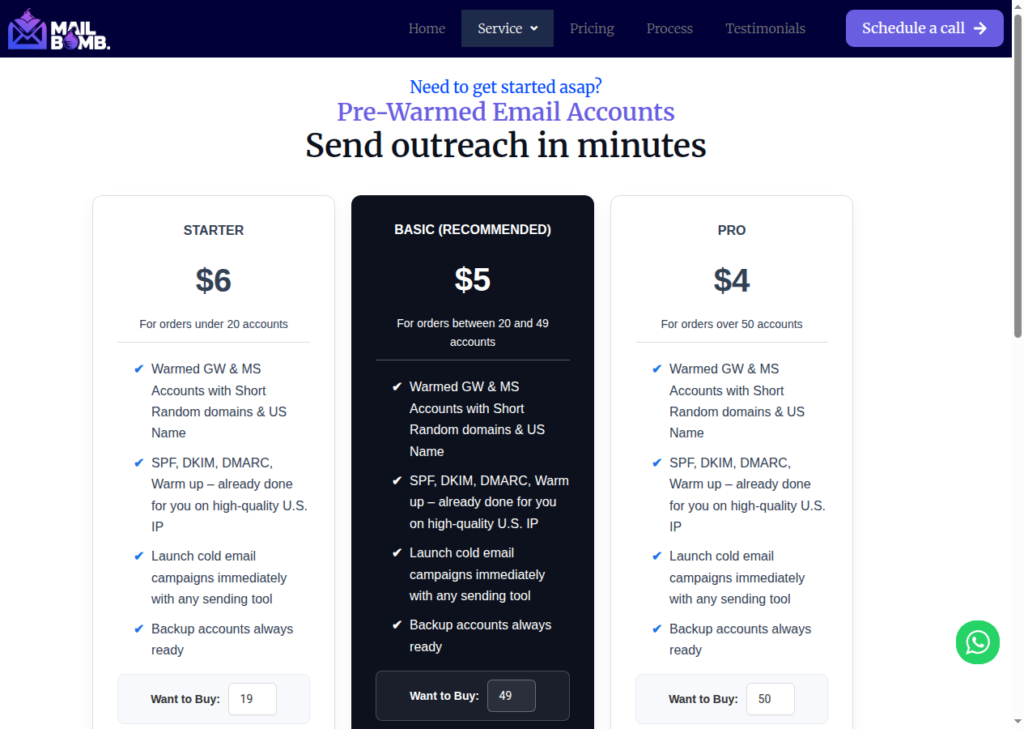
MailBomb offers both fresh and pre-warmed inboxes. Fresh Google and Microsoft inboxes start at $2 and $3, respectively. Setup takes about 1-2 business days and integrates with any sending tool. The pre-warmed inboxes cost $6 for both. However, they don’t share how they warm them up. Also, it doesn’t include burn monitoring or ongoing warmup.
- Inbox: Both fresh and Pre-warmed - Google and Microsoft
- USP: Google inboxes at $2
- Deliverability: Poor (Bangladesh Origin)
- Risk: No Warmup and Monitoring
- Starting Plan: Google - $2, Microsoft - $3, Pre-warmed - $6 (price/inbox)
- Support: WhatsApp, Slack, and Email

About MailBomb
MailBomb offers Google and Microsoft inboxes, sourced from official resellers. The inboxes are available in both fresh and pre-warmed; fresh inboxes are billed monthly for ~$2, and pre-warmed are $6/inbox.
On the website, the IP is mentioned as US-based. But one key piece of information not mentioned on the website is the account origin, which is Bangladesh. When you buy Google inboxes from an Asia-based official reseller, they’ll cost less than the actual Google account cost, which is ~$7-8 in the US.
The setup is another concern! Where other cold outreach email service providers provision within hours, MailBomb takes 1-2 business days.
If you can’t wait and want to start sending from day 1, you can also buy pre-warmed inboxes. But MailBomb doesn’t disclose how they warm them up. So the credibility of the outreach setup is unknown.
Things that are not included – Ongoing warmup, domain monitoring, and domain-burn alerts.
The only way to know that your domains are burnt is when your reply rates dry up.
How MailBomb Works
MailBomb Features
Google & Microsoft Inboxes
Having multiple inbox types is good. You can spread your sending across the two providers from one vendor. So you won’t have to juggle between different vendors. The only drawback – the origin of the accounts is Bangladesh, which might affect inbox placement.
Pre-Warmed Inboxes
If you want to send from day 1, you can buy pre-warmed inboxes. But MailBomb didn’t disclose the warmup methodology. Whether Google inboxes are paired with Google inboxes, how long the warmup runs, or the ramp up frequency, nothing is mentioned.
Pros
Multi-Inbox Provider
MailBomb is a multi-inbox provider offering Google and Microsoft inboxes. This makes it easy to diversify your campaigns across these inboxes.
Pre-Warmed Inboxes
If you want to start sending from day 1, then pre-warmed inboxes are a good choice. However, they haven’t mentioned the warmup methodology. It’s hard to predict how these inboxes will perform.
Cheap Sticker Price
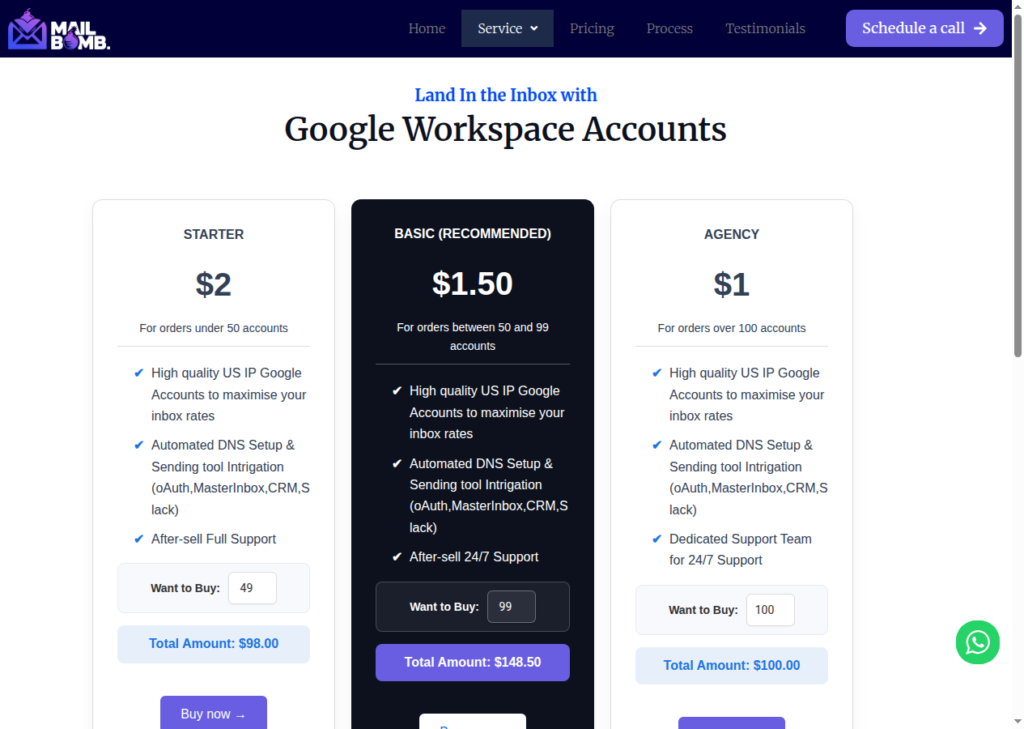
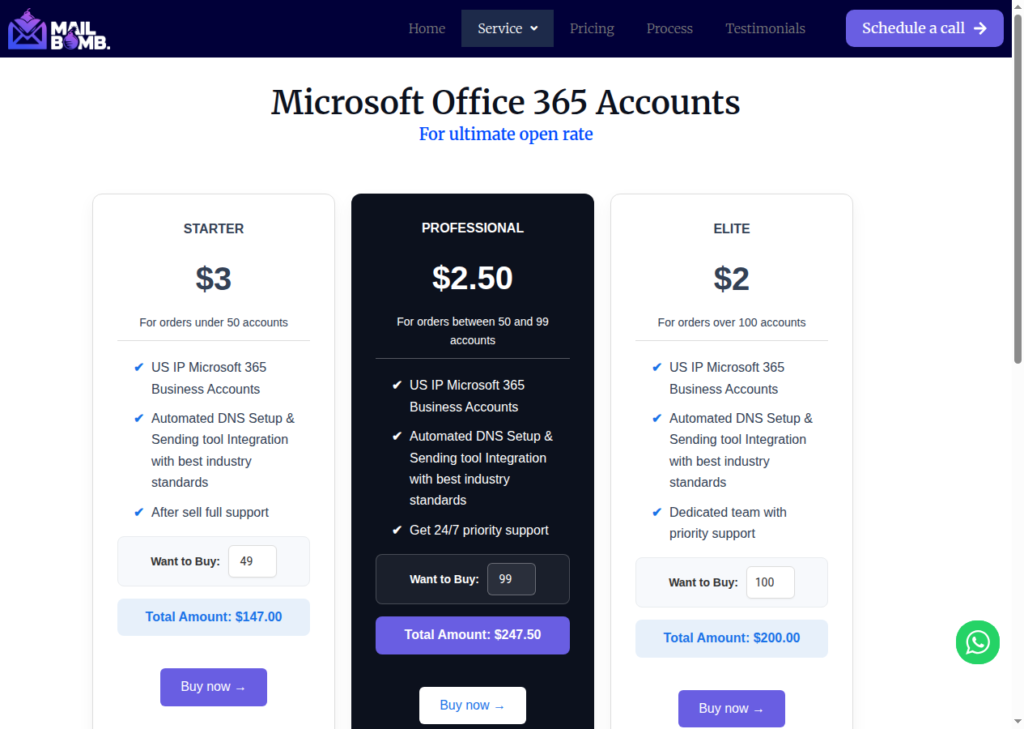
MailBomb pricing is cheaper at volume. Google inboxes go from $2 to $1 at scale – minimum 100 inboxes for $1/inbox, and Microsoft goes from $3 to $2.
Cons
No Burn or Deliverability Monitoring
Burn monitoring is one of the most effective ways to evaluate domain performance. However, MailBomb doesn’t provide burn monitoring or inbox placement tests, so you have to rely on your own testing.
No Isolation Disclosure
Every inbox on a domain shares that domain’s reputation. So if you put too many inboxes in a single domain and one inbox gets flagged, it can bring down the domain’s performance. Most of the cold email setups use 3-4 inboxes per domain. However, MailBomb doesn’t say how many inboxes it uses per domain.
Account Origin – Bangladesh
MailBomb doesn’t say where they source inboxes. Google inboxes cost ~$7/inbox in the US, so prices as low as $1 suggest they resold inboxes from official resellers. Since the company is based in Bangladesh, my best guess is that the accounts originate from Bangladesh.
No Warmup Methodology Defined
Although you can buy pre-warmed inboxes from MailBomb, it hasn’t defined its warmup methodology. So you wouldn’t know whether the warmup is through Google-to-Google accounts with the same geo match, or what the ramp-up frequency is. Therefore, the credibility is unknown.
Can’t Buy Inboxes Directly from The Website
The buy now buttons for each plan redirect to the homepage! The only way to buy inboxes is by scheduling a call.
MailBomb Pricing
| Inbox Type | Plan | Price/inbox | Inboxes Limit |
|---|---|---|---|
| Starter | $2 | Under 50 | |
| Basic | $1.50 | Between 50-99 | |
| Agency | $1 | 100+ | |
| Microsoft | Starter | $3 | Under 50 |
| Microsoft | Professional | $2.50 | Between 50-99 |
| Microsoft | Elite | $2 | 100+ |
| Pre-warmed GW & MS | Starter | $6 | Under 20 |
| Pre-warmed GW & MS | Basic | $5 | Between 20-49 |
| Pre-warmed GW & MS | Pro | $4 | 50+ |
Aerosend: Best MailBomb Alternative
MailBomb is a multi-inbox provider offering fresh and pre-warmed Google and Microsoft inboxes. They handle the setup for you, which takes about 1-2 business days, which is very slow.
During setup, their team sets up DNS configuration + creates accounts on the shared workspace + connects inboxes to your sequencer. There’s no self-serve dashboard or public API, so every step is manual and dependent on their team.
Here are more downsides to MailBomb –
- Account origin – Bangladesh
- No monitoring
- Offers pre-warmed, but warmup methodology is not defined + there’s no ongoing warmup
- Purchase is gated behind a call
But Aerosend offers complete cold email infrastructure, which includes –
- Isolation, i.e., 10 domains and 30 inboxes
- IPs are geo-mapped
- Warmup methodology is defined: a 21-day ramp-up using WarmupInbox (complementary)
- Bi-weekly inbox placement tests
- Proactive monitoring of domain’s performance using domain burn alerts
- One-click purchase on the website
Here is the detailed comparison between MailBomb and Aerosend:
| Compare | MailBomb | AerosendPrivate infrastructure |
|---|---|---|
| Inbox Available | GoogleMicrosoftPre-warmedFresh or pre-warmed; accounts sourced from Bangladesh resellers | Private infrastructureBuilt for cold email, so no Google or Outlook bans |
| Isolation | ✕Not disclosedInboxes-per-domain ratio not stated | ✓DedicatedNew isolation every 10 domains / 30 inboxes, never shared |
| Warmup | ~Pre-warmed onlyNo ongoing warmup; warmup methodology not disclosed | ✓Included, ongoingComplimentary premium warmup, matched to who you email |
| Monitoring | ✕Not offeredNo domain or deliverability monitoring included | ✓Six metricsEvery domain scored daily and surfaced to you |
| Deliverability | ✕You own itNo inbox placement tests; you run your own | ✓Our responsibilityBiweekly inbox placement tests, included |
| Domain Burn Alerts | ✕Not offeredYou find out when reply rates dry up | ✓IncludedBurnt domains flagged within 5 minutes, replaced in one click |
| Pricing | From $2/inboxGoogle $2 to $1 at 100+; pre-warmed from $6 | $4 / inbox$2 per inbox past 150 · 30 inboxes = $120/mo |
| Ready To Test? | Visit MailBomb Website ↗ | Try Aerosend For Free |
Price/Inbox Breakdown (~5,000 emails/day)
| Requirements | MailBomb | Aerosend |
|---|---|---|
| Inboxes Required | 200 | 200 |
| Send Rate/Inbox | ~20-25/day | ~20-25/day |
| Plan | Google – Agency Plan Microsoft – Elite Plan | Blended |
| Per-Inbox Cost | Google – $1 Microsoft – $2 | $3.50 (blended) |
| Total Monthly Cost | ~$300 | ~$700 |
MailBomb Support
You can reach MailBomb support through WhatsApp, Slack, and email.
Premium plans include 24/7 dedicated support after purchase. But the guaranteed response times are not mentioned on any of the review sites – Trustpilot, G2, etc. – as there are no independent reviews on either.
The Verdict
MailBomb is a good fit if you can run your own warmup and deliverability and simply want the cheapest Google and Microsoft inboxes.
However, the account originates in Bangladesh, and that alone can affect inbox placement. With no good sending reputation for Bangladesh-based accounts, your campaign deliverability will always be mixed.
Also, it doesn’t offer monitoring and warm-up.
But if you want your deliverability managed, which includes proper isolation per domain, premium warmed-up accounts, timely inbox placement tests, and domain alerts for sustaining high inbox placement, then try Aerosend.
