

Inboxing offers one thing, and bundles it well. It offers Azure inboxes priced per domain. The starting plan is billed monthly at $30 for 1 domain. Each domain hosts 25 or 49 inboxes and can send up to 2-5 cold emails per day.
The setup is automated but is comparatively slow. The inboxes are provisioned and ready for cold email within 24 hours.
In this Inboxing review, I’ll focus on one thing: whether packing 25 or 49 inboxes onto one domain can actually deliver?
Key Takeaways
Inboxing is an Azure inbox provider for cold outreach. On the $30 starting plan, you can set up to 25 or 49 inboxes and send up to 245 cold emails/day. The setup is fully automated, and your inboxes are ready for cold outreach within 24 hours. The only drawback: there’s no warmup or domain monitoring. It offers easy domain replacement, but to do so, you need to know which domains are burnt.
- Inbox: Azure
- USP: 100% fully automated 24-hour setup
- Deliverability: Low
- Risk: No ongoing warmup or burn monitoring
- Starting Plan: $30/domain
- Support: Poor Support Quality
About Inboxing
Inboxing is an email service provider offering Azure inboxes for cold outreach. For $30, you can setup a domain with 25 or 49 inboxes, which is authenticated and ready to send within 24 hours.
The setup is 100% automated, and with API access, you can integrate inboxes into your Sequencer.
You can send up to 100-250 emails/day/domain and receive premium support at each tier.
How Inboxing Works
Inboxing Features
Automated Setup & 24-Hour Turnaround
Inboxing offers 100% automated setup. You only need to bring your domain, and everything will be done for you within 24 hours.
Full API Access
At every tier, API access is included. It is genuinely useful for agency wiring provisioning into your sending stack.
Multi-Name Input & Domain Swapping
You can upload names by CSV and delete in bulk with API calls. Inboxing offers easy domain swapping for burnt domains.

Pros
100% Fully Automated Setup
Normally, a large batch of Azure inboxes would take a day for DNS configuration and provisioning. But with Inboxing, the process is 100% automated.
Cheap Per-Inbox Entry Price
The core benefit of using Azure inboxes for cold outreach is that it is cheaper compared to Google and Microsoft inboxes. On Inboxing, you can host 49 inboxes on a single domain at $30/domain.
Cons
Deliverability Issue With Azure Inboxes
Azure inboxes deliverability success rate is low compared to Google, Microsoft and private infrastructure. On Inboxing, all 49 Azure inboxes are hosted under one domain reputation. A single burn signal will drag every inbox hosted on the domain.
Low Sending Limit
You can send up to 2-5 emails/day/inbox from Azure inboxes. If you buy Inboxing $30 Starter Plan, from one domain you can send up to 245 emails/day.
No Warmup Included
Inboxing doesn’t provide warmup! All the Azure inboxes are fresh. You need to run the warmup through your sequencer.
No Deliverability Monitoring
Inboxing doesn’t provide burn monitoring, inbox placement, etc. You need to rely on external tools to monitor your domains.
Inboxing Pricing
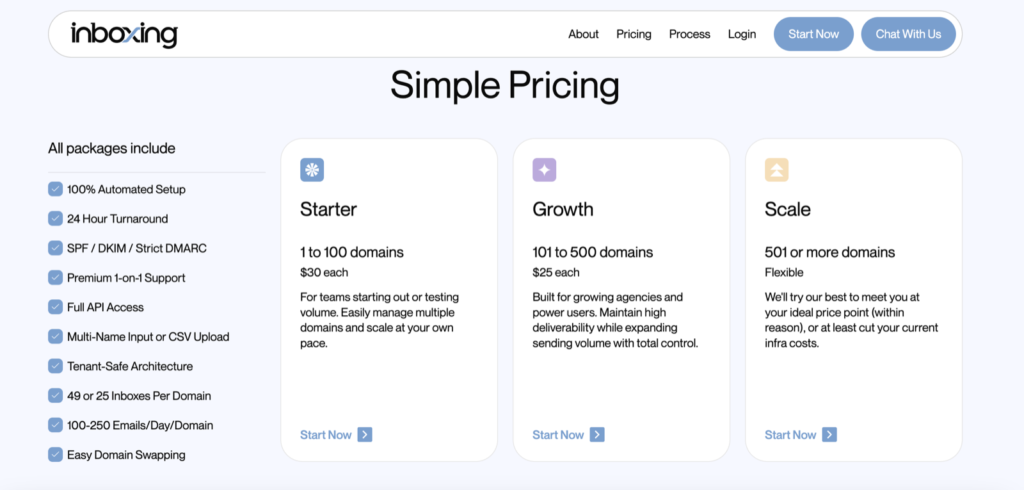
| Tier | Domains | Price/domain/mo |
|---|---|---|
| Starter | 1-100 | $30 |
| Growth | 101-500 | $25 |
| Scale | 501 or more | Flexible |
Note: On each domain, you can host up to 25-49 Azure inboxes and send up to 2-5 emails/day from each Azure inbox.
Aerosend: Best Inboxing Alternative
On entry price, Inboxing is cheaper. It offers $30/domain and you can provision up to 25-49 Azure inboxes on one domain. It costs roughly $0.61/inbox and can send 2-5 emails/day/inbox.
Aerosend offers 3 domains, i.e. 30 inboxes and is billed monthly for $120. You can send up to 20-25 emails/inbox.
But here’s what the gap between the two prices actually buys.
At Aerosend, the domains are hosted on a dedicated server. This isolation allows complete management of your cold email campaign. You can easily manage your deliverability. Also, the inboxes are warmed up using a premium service, Warmupinbox.
Here’s the brief comparison between Inboxing and Aerosend:
| Compare | Inboxing | AerosendPrivate infrastructure |
|---|---|---|
| Inbox Available | Azure25-49 Azure inboxes per domain | Private infrastructureBuilt for cold email, so no Google or Outlook bans |
| Isolation | ✕SharedUp to 49 inboxes share one domain reputation | ✓DedicatedNew isolation every 10 domains / 30 inboxes, never shared |
| Warmup | ✕Not includedInboxes arrive fresh; you run warmup in your sequencer | ✓Included, ongoingComplimentary premium warmup, matched to who you email |
| Monitoring | ✕Not includedYou rely on external tools to monitor domains | ✓Six metricsEvery domain scored daily and surfaced to you |
| Deliverability | ✕Self-managedNo inbox placement testing; deliverability is on you | ✓Our responsibilityBiweekly inbox placement tests, included |
| Domain Burn Alerts | ✕Not offeredDomain swapping available for burnt domains, no detection | ✓IncludedBurnt domains flagged within 5 minutes, replaced in one click |
| Pricing | From $30/domain25-49 Azure inboxes per domain, roughly $0.61/inbox | $4 / inbox$2 per inbox past 150 · 30 inboxes = $120/mo |
| Ready To Test? | Visit Inboxing Website ↗ | Try Aerosend For Free |
Price/Inbox Breakdown (~5,000 emails/day)
| Requirements | Inboxing | Aerosend |
|---|---|---|
| Inboxes Needed | 21 Domains and 1,000 Inboxes | 200 |
| Send Rate/Inbox | ~2-5 emails/day | 20-25/day |
| Plan | Starter | 150 @ $4 + 50 @ $2 |
| Per-Inbox Cost | $0.61 | $3.50 (blended) |
| Monthly Total | ~$630 | ~$700 |
| Deliverability | Self-managed | Managed |
Inboxing Support
“Premium 1-on-1 Support” is available with each tier, but the credibility of Inboxing support is unknown. You can reach out to the support via WhatsApp at wa.me/14162727110, or chat.
The Verdict
For a beginner cold emailer who wants to test Azure inbox deliverability, Inboxing is the best choice. It is cheap, everything will be setup for you and premium support is available.
But if you’re an experienced cold emailer, and looking to diversify to sustain or grow deliverability, then Aerosend is the better option for you. It offers dedicated infrastructure, isolation with domain-per-IP ratio.
For improving your deliverability rate, Aerosend offers complementary warmup using Warmupinbox and burn monitoring.
To know how you can improve your deliverability, schedule a call now with Namit, Smartlead Hall of Famer and Co-Founder at Aerosend.
