

Icemail sells cold-email inboxes on Google, Microsoft, Azure, and private infrastructure. The legit way to plan your cold outreach campaign is by diversifying it across different inboxes. For example, you need to have a good mix of Google, Microsoft, and private infrastructure inboxes. Supposedly, if there are any updates to Google compliance, you can always shift the sending frequency to Microsoft and private infrastructure.
There are not many email service providers that offer this diversification. Icemail is an exception, offering Google, Microsoft, Azure, and private infrastructure. The inboxes are available from $2.5/inbox/mo.
But is it a good strategy to diversify using the same ESP, or diversify that well too? In this Icemail review, I’ve answered this question.
Key Takeaways
Icemail is a multi-inbox provider – Google, Microsoft, Azure, and private infrastructure. Fresh inboxes are billed monthly for $2.5/inbox, and pre-warmed inboxes are available for $5/inbox. The setup is lightning fast – automated DNS configuration and one-click integration to Sequencer using the API. But offers no monitoring and the warmup methodology is not defined.
- Inbox: Google, Microsoft, Azure and Private Infrastructure
- USP: Setup speed is quick and automated with API
- Deliverability: Mixed
- Risk: No monitoring
- Starting Plan: $2.50/inbox/mo
- Support: Good

About Icemail
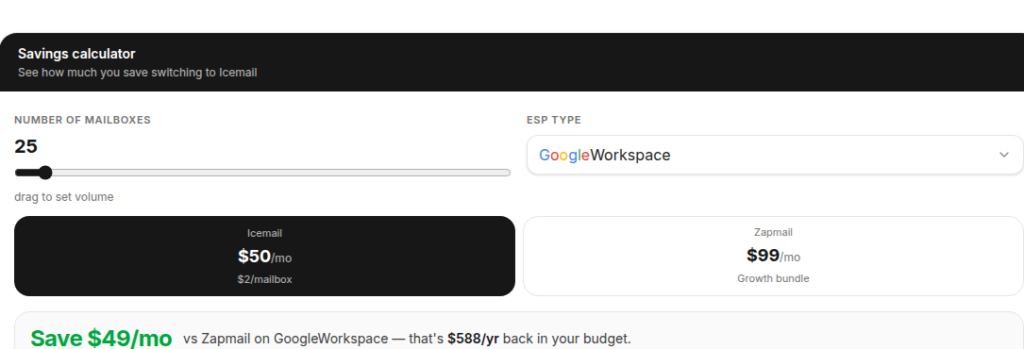
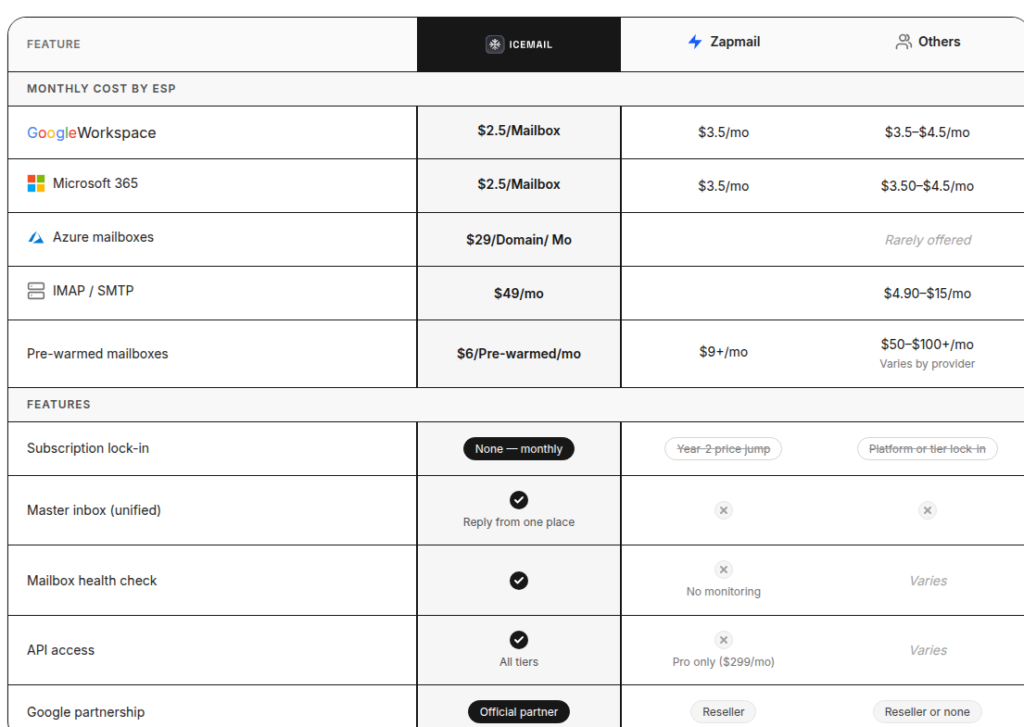
Icemail offers Google, Microsoft, Azure, and private infrastructure for cold outreach. It offers inbox diversification, which is missing from most email service providers. It also positions itself as a cheaper alternative to Zapmail, benchmarking its pricing against it.
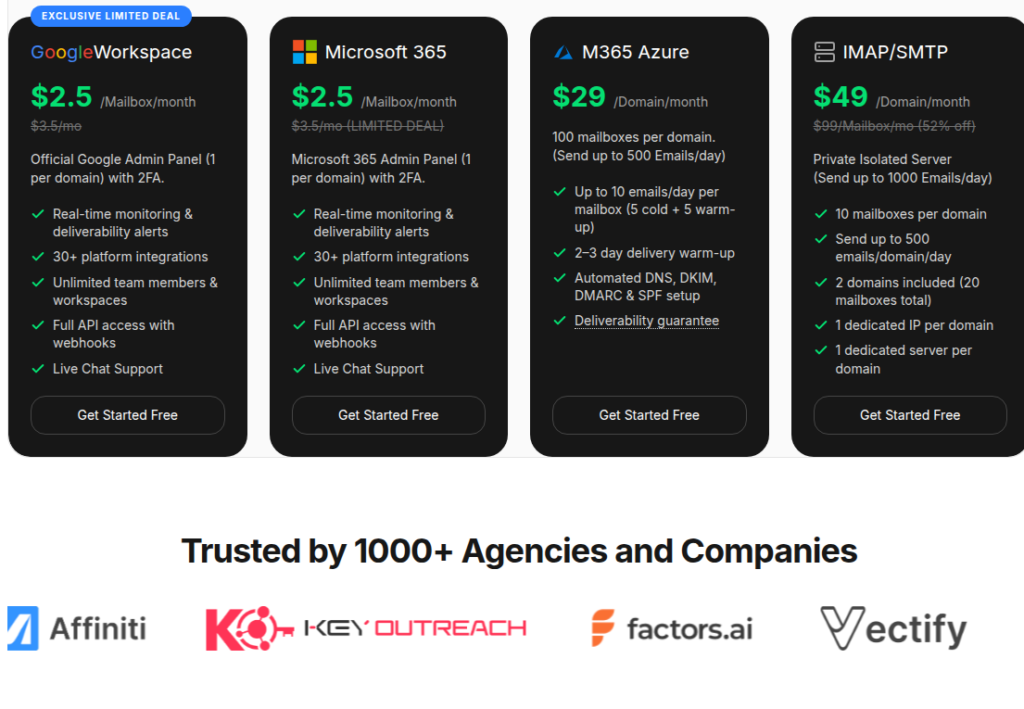
The US-IP Google and Microsoft are billed monthly at $2.5/inbox. Azure is billed $30/domain/mo and contains 100 inboxes/domain. Private infrastructure offering a dedicated IP is billed at $18/domain/mo.
The setup is quick, with automated DNS setup and bulk inbox provisioning taking only 30 minutes. You can export inboxes to your sequencer with one click using the API.
You’ve the option to buy fresh inboxes and run warmup through your sequencer or buy pre-warmed Google and Microsoft inboxes at $5/inbox/mo. But the warmup methodology is not defined. Therefore, the credibility of the warmup is not known.
Although the website mentions “Real-time monitoring & deliverability alerts”, the methodology is not defined, and its credibility is not known.
How Icemail Works
Icemail Features
Multi-Inbox Provider
You can buy real Google, Microsoft, and Azure inboxes or get dedicated infrastructure for cold outreach. It enables the diversification necessary to run cold email campaigns at scale.
Automated DNS Setup
The setup is quick and auto-configures SPF, DKIM, DMARC, and MX for bulk inboxes in minutes. The setup speed is crucial if you want to send cold emails from day 1.
One-Click Export and 30+ Integrations
You can export inboxes in one click, no re-warming and no CSV shuffling, into 30-plus sequencers: Instantly, Smartlead, etc.
Dedicated IP for Private Infrastructure
Icemail offers dedicated IP where you can manage your own sending reputation. It’s never shared, so there’s no bad neighbor to bring down your deliverability.
Separate Workspaces for Agencies
For an agency juggling many clients, a separate workspace per client is required. An unlimited number of team members can join the workspace and lead cold outreach. This admin isolation is good to have if you have multiple clients.
Pre-Warmed Inboxes at $5/inbox/mo
At Icemail, you can either buy fresh or pre-warmed Google and Microsoft inboxes. Pre-warmed inboxes are available for $5/inbox/mo. It reduces the dependency on running warmup through Sequencer, and you can also start cold emailing from day 1.
Pros
Fast, Bulk Provisioning That Delivers on Speed
Icemail’s most-repeated praise across reviews is speed. Connect a domain and it bulk-adds dozens of inboxes, then exports them all in an afternoon.
Cheap Google and Microsoft Inboxes
On Icemail, Google and Microsoft inboxes are available for $2.5/inbox/mo. This price margin is the best among the Google and Microsoft inbox providers.
Responsive Support
Across multiple Trustpilot reviews, the support is appreciated for being fast.
Domains and mailboxes are easy to purchase and set up. Customer service is very responsive and eager to help.
qpav, Trustpilot
Separate Workspaces Built for Agencies
For an agency handling multiple clients, a workspace per client keeps operations clean. Icemail offers admin-level isolation for Google and Microsoft inboxes.
I have worked with other resellers for Google Workspace and Icemail is by far the most easiest to manage
Shawn Kelly Hodgson, Trustpilot
Cons
The $2.5/inbox Price Signals a Reseller Account Model
Icemail sources inboxes from Indian-origin resellers. Any Google inbox under $7/inbox is the industry’s signal that seats came through the cheap reseller channel.
No Deliverability Monitoring and Burn Alerts
There are no burn alerts, inbox-placement testing, or blacklist monitoring. The first sign of a domain burning is a decline in per-domain reply rate. If there’s no way to monitor, you’ll never be able to diagnose at the domain level.
After 3 weeks they lost their MX, DMARC and SPF Record, cutting my campaigns.
Bakipy, Trustpilot
Warmup Methodology Not Defined
You can either buy fresh or pre-warmed Google and Microsoft inboxes from Icemail. However, with pre-warmed inboxes, the warmup methodology is not defined. There’s no way to verify the credibility of the warmup pool, ramp-up, etc.
Free Mailbox Replacement Confusion
On its website, Icemail mentions “Unlimited and free mailbox replacement”. There’s no documentation on how it works or is activated.
Icemail Pricing
| Inbox Type | Price/inbox/mo |
|---|---|
| $2.5 | |
| Microsoft | $2.5 |
| M365 Azure | $29/domain |
| IMAP/SMTP | $49/domain |
Note: Pre-warmed Google and Microsoft inboxes are billed monthly for $5/inbox.
Icemail has the best pricing for Google and Microsoft inboxes.
One of the most affordable inbox providers out there.
Atiksh Puthran, Trustpilot
At $2.50 a pop, it’s a steal compared to what I was paying before.
Clara Turner, Trustpilot
they have the best pricing in the industry.
Shawn Kelly Hodgson, Trustpilot
Aerosend: Best Icemail Alternative
Icemail is a multi-ESP offering Google, Microsoft, Azure, and Private infrastructure for cold outreach. They source Google and Microsoft inboxes from official resellers and offer it for $2.5/inbox/mo.
A user can also buy pre-warmed inboxes for $5/inbox/mo, but the warmup methodology is not defined. So you’ll never know the credibility of the warmup pool or ramp-up strategy.
Also, there’s no way to know whether your domains are being burned. The deliverability monitoring is not available. The only way to know that your domains are burnt is if your reply rate drops.
If these mechanisms are not managed properly, your deliverability will be affected immensely. Aerosend manages both these mechanisms for you. It offers premium warmup via WarmupInbox (the best in the industry) and conducts biweekly inbox placement tests. Aerosend manages deliverability for you and offers the best services required for high deliverability success.
Here’s the brief comparison between Icemail and Aerosend –
| Compare | Icemail | AerosendPrivate infrastructure |
|---|---|---|
| Inbox Available | GoogleMicrosoftAzurePrivate infraPre-warmedPre-warmed Google and Microsoft at $5/inbox | Private infrastructureBuilt for cold email, so no Google or Outlook bans |
| Isolation | ~Dedicated IP, private infraDedicated IP on private infra; admin isolation for Google and Microsoft | ✓DedicatedNew isolation every 10 domains / 30 inboxes, never shared |
| Warmup | ~Pre-warmed onlyFresh inboxes need sequencer warmup; no ongoing warmup | ✓Included, ongoingComplimentary premium warmup, matched to who you email |
| Monitoring | ~Claimed, unverifiedSite claims real-time alerts; review found no monitoring | ✓Six metricsEvery domain scored daily and surfaced to you |
| Deliverability | ✕Self-serveNo placement testing; you own monitoring and recovery | ✓Our responsibilityBiweekly inbox placement tests, included |
| Domain Burn Alerts | ✕Not offeredFirst burn signal is a drop in reply rate | ✓IncludedBurnt domains flagged within 5 minutes, replaced in one click |
| Pricing | From $2.5/inboxGoogle and Microsoft monthly; Azure $29/domain; pre-warmed $5/inbox | $4 / inbox$2 per inbox past 150 · 30 inboxes = $120/mo |
| Ready To Test? | Visit Icemail Website ↗ | Try Aerosend For Free |
Price/Mailbox Breakdown (~5,000 emails/day)
| At ~5,000 emails/day | Icemail | Aerosend |
|---|---|---|
| Inboxes Required | Google and Microsoft = 167 Private Infrastructure = 100 | 200 |
| Send Per Rate Inbox | Google and Microsoft = 15 Private Infrastructure = 10 | 20-25/day |
| Domains | 10 | 20 |
| Plan | Mixed | 150 @ $4 + 50 @ $2 |
| Per-Inbox Rate | $2.24 (blended) | $3.50 (blended) |
| Monthly Total | $597.50 | ~$700 |
| Deliverability | Self-managed | Managed |
Icemail Support
Support is available on live chat and WhatsApp, and a book-a-call link is available. But there’s no phone line or dedicated Slack.
If you talk about support quality alone, Icemail support is very good.
their support team has been excellent anytime I’ve needed help … take the time to resolve issues instead of sending generic responses.
Matt McCray, Trustpilot
The Verdict
Overall, Icemail is good! If you’re looking to diversify, it offers every infrastructure available for cold outreach – Google, Microsoft, Azure inboxes, and dedicated private infrastructure. Setup is quick: one-click export to sequencer; the inboxes are ready for cold outreach in minutes. It also offers pre-warmed inboxes for $5/inbox/mo, but its methodology is not defined. If you have run cold email campaigns previously and know how to warmup inboxes properly and monitor domain deliverability, then Icemail is the right fit for you.
Aerosend offers dedicated infrastructure built around high deliverability success. The isolation is at the IP level, and each server hosts up to 3 domains > 30 inboxes.
Deliverability is all about managing and maintaining those inboxes. Before cold outreach, these inboxes are properly warmed up for 3 weeks using WarmupInbox. Once they’re properly warmed, you can proceed with cold emailing.
Aerosend frequently conducts various tests to ensure your deliverability is maintained. With frequent inbox placement and burn monitoring, it diagnoses the affected inboxes proactively and takes a conscious call – to pause the campaign and run it through warmup, etc.
If you want better deliverability, Aerosend is the right fit for you.
