Our team is analyzing your data to create a comprehensive deliverability report tailored just for you.
Almost done! Open the email sent to and verify to receive your completed report
Compare reply rates, bounce rates, and click rates across all your email providers
2.1%
1.8%
1.1%
Deep dive into your most successful campaigns and discover what's driving results
EXCELLENT
2,450
Emails Sent
GOOD
1,890
Identify problematic domains and ESP providers affecting your deliverability
Good
0.8%
At Risk
0.3%
Problematic
Performance breakdown by campaign tags to identify your most effective segments
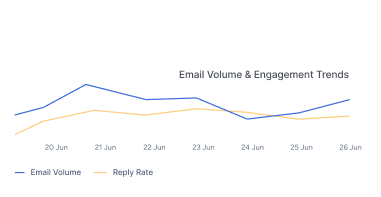
Track your email volume and engagement trends over time with beautiful charts
4-step setup to inbox placement
Real results from 150+ agencies
Connect with Instantly, SmartLead & more
Every 10 domains get dedicated infrastructure
Know before your deliverability drops
Always sending from the highest-quality IPs
Generate domain ideas for cold email
Check your inbox placement score
Validate your email authentication
Check if your domain or IP is blacklisted
Test if your email lands in spam
Cold email tips, guides & strategies
Free course — 4 hours, 348+ students
107 cold email & deliverability terms
Ready-to-use Clay enrichment templates
The complete cold email playbook — free
Resell Aerosend under your own brand
Click on your profile icon in the bottom-left corner, then select “Settings” from the dropdown menu.
In the Integrations page, click on the “API Keys” tab in the left sidebar.
If you already have an API key with the all:read scope, you can use that key.
If not, click the “Create API Key” button, select the all:read scope, and make sure to save your new API key somewhere safe.
Click on the “Settings” option in the top right corner profile icon.
In the Settings page, under your profile picture, you can see the SmartLead API Key.
If you already have an API key displayed, you can use that key. If not, click the “Generate API Key” button to create a new one.