Most outreach campaigns target cold audiences who have never heard of you and may never care.
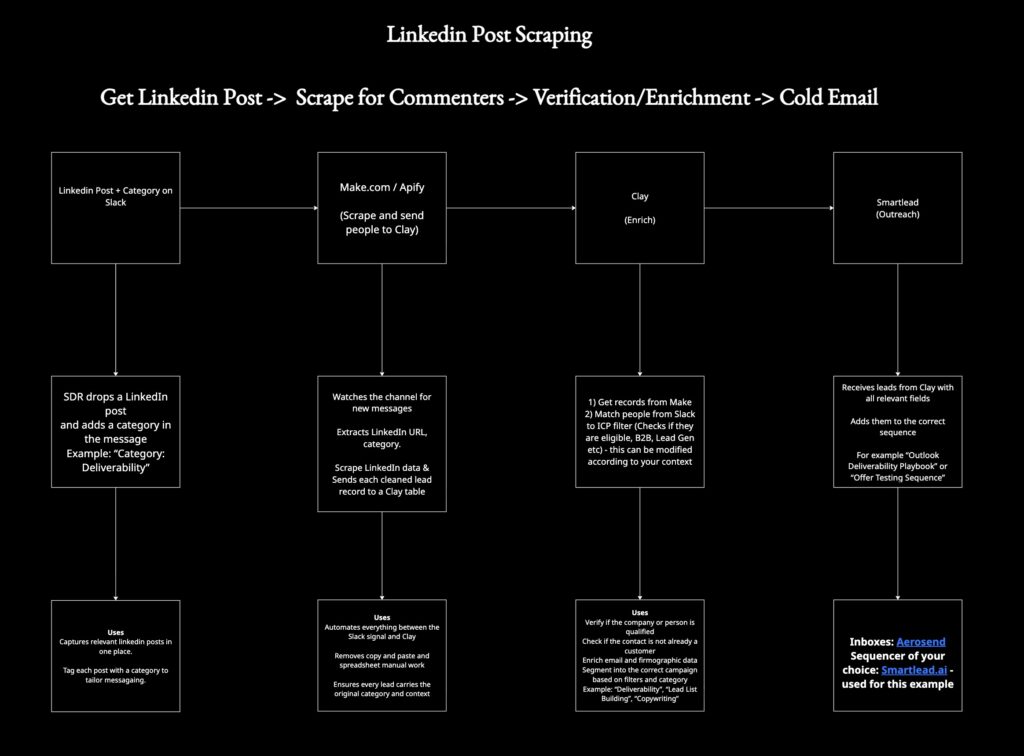
But on LinkedIn, people already tell you what they’re interested in every time they comment, like, or request a lead magnet. So we built this workflow to collect LinkedIn post commenters, enrich them, filter for ICP fit, and send them directly into outbound campaigns, all done automatically.
You can copy and paste it for your own team or clients.
Requirements:
Import the Make template
- Click “Add to my account”
- Open the scenario
Connect Your Tools
- Connect your Slack account in the first module
- Connect your scraper API in the HTTP module (Apify, Phantombuster, Clay Scraper, or your own endpoint)
- Paste your Clay webhook URL into the last HTTP module
Run a Quick Test
- Click Run once
- Drop a Slack message like: LinkedIn URL: <your link> Category: Deliverability
- You should see commenters flow into Clay automatically
Step 1: Drop a LinkedIn Post into Slack
The workflow starts by identifying content that reveals intent. Typically, posts that offer value, lead magnets, or opinions relevant to your ICP.
Here’s how to trigger it:
- Copy the LinkedIn post URL
- Paste it into a specific Slack channel
- Add a keyword tag like:
DeliverabilityLead ListsOutbound StrategyAgency Owners
These tags help map the right audience segment later. It takes seconds and replaces hours of manual prospect research.
Step 2: Automatically Scrape Commenters
Once the URL hits Slack, the workflow picks it up and triggers a scraper. That scraper:
- Collects every commenter on that LinkedIn post
- Removes the original author
- Cleans formatting and duplicate records
- Sends the raw data forward
You now have a list of people who:
- Saw the content
- Engaged
- And showed real interest
This beats cold scraping random job titles.
Step 3: Send Everything Into Clay for Enrichment
Next, the scraped commenters go directly into Clay. Your Clay table should:
Apply ICP rules
- Industry
- Company size
- Region
- Funding
- Role seniority
Verify contact information
- Work emails
- LinkedIn profiles
- Company domain
Segment leads based on your earlier Slack tag
Example groups:
- “Deliverability”
- “Lead List Building”
- “Outbound Strategy”
Step 4: Send to Outreach Sequences
Once the list is enriched and segmented, the workflow sends each segment into your outbound engine. Examples:
We run these through Smartlead with Aerosend inboxes for reply-safeguarded deliverability. Outreach goes out automatically to email and/or LinkedIn.
Alternative Compatible Tools (Optional)
If your tech stack looks different, here are interchangeable components:
- Slack → Notion, Airtable, internal form
- Make → Zapier, n8n, Clay native automation
- Smartlead → Instantly, HubSpot sequences, Apollo outbound
The workflow stays identical regardless of tools.
Guardrails
- Only email verified work addresses, not personal ones
- Respect unsubscribes and preferences
- Avoid scraping private communities or protected identities
- Keep outreach valuable
Files Included
If you want to implement this, we packaged everything:
- A Miro map explaining the full system in plain language
- A Make automation blueprint that picks up Slack messages and triggers scraping
- A Clay table template that enriches, filters ICP, and segments leads
Use Cases
This setup works well for:
- Agencies selling services to startup founders
- SaaS teams targeting operators, marketers, or sales teams
- Creators distributing lead magnets or monetizing content
- Consultants building segmented email lists based on topic interest
- Anyone running content-led outbound motions